Although Apple designed the iPhone to be used without a stylus, there may still be some benefits to using one. Ten One Design sent me their iPhone-compatible Pogo Stylus for review.
Watch my video demonstration of the accessory below:
Recap:
Pogo Stylus – Pros
- Great for use with gloves
- More precise than your fingers
- Clip adds very little bulk to iPhone
Pogo Stylus – Cons
- Stylus fits very tightly into clip, so some force is required to remove it
- Clip may be difficult (or impossible) to attach if you use an iPhone case
- Useless for multi-touch tasks, like zooming
- Update: The old Pogo Stylus clip does not fit the new iPhone 3G, and Ten One Design now sells a clip that fits only the 3G iPhone.
Pogo Stylus photos:
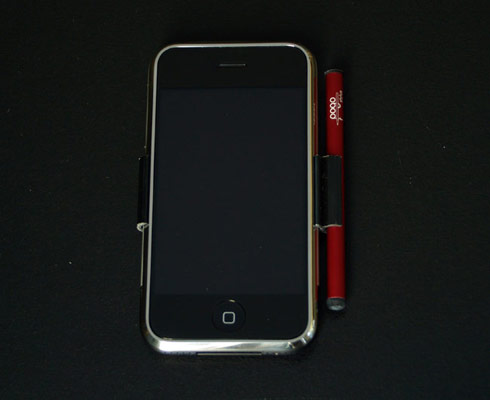
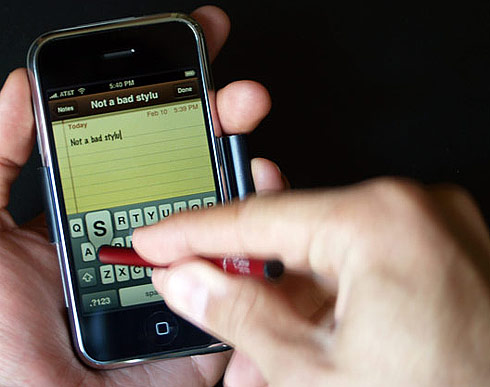
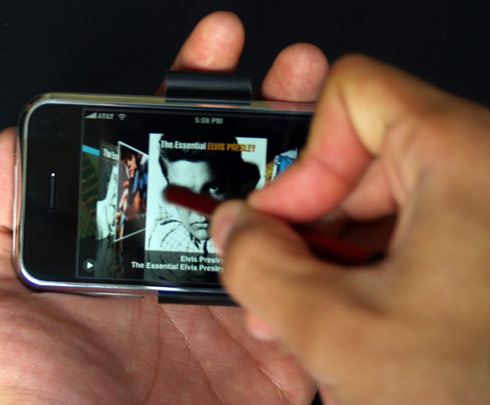
The Pogo Stylus costs $25 $14.95 (price was reduced). For more information or to buy a stylus for your iPhone, visit Ten One Design.
I have had a lot of stylus’s in one years time. they don’t seem to
last very long, the rubber goes flat and won’t work anymore. I’m wondering ,since this has a different material tip, how long it will last.
This is my first time asking
I have had a lot of stylus’s in one years time. they don’t seem to
last very long, the rubber goes flat and won’t work anymore. I’m wondering ,since this has a different material tip, how long it will last.
Pogo Stylus works great with the OmniSketch iPad Drawing App!
App Store Link: http://itunes.apple.com/app/omnisketch/id370938461
* 18 amazing brushes draw shapes and patterns automatically
* Intuitive user interface
* Eraser
* Mirrored Drawing – Vertical, Horizontal and Kaleidoscope mode
* Line width adjustment
* Opacity adjustment
* Brush custom adjustments
* Full color support with an intuitive color picker
* Selectable background color
* Gallery allows you to view, add, edit, delete and export your artwork
* Built in slide show feature lets you show off your creations
* Online gallery lets you share your pictures with friends, family and the world
* Full undo/redo is supported
Lots of of bloggers are not too pleased with the new iPad.There was 2 much hype over it and alot people got turned off.Quite frankly, I actually see great deal of the cool potential uses of this gadget. Third-party soft for working with music, games, newspapers and magazines and books, all kinds of awesome stuff, but IMHO they just didn’t really sell it right (aside from the books). It feels kind of incomplete
I have Renauds which means cold fingers and toes. My iphone does not respond well to my cold fingers so I am sending for the stylus. Thanks for the review.
I have been waffling between the iPod Touch and Palm TX. I don’t need the phone functionality of the iPhone. I am looking more for the calendar, contact, email & web functions at hotspots. I have very long nails and have extreme difficulty with the keyboard even horizontal. I have been leaning toward the Palm because of the stylus input option. The guy at the Apples store suggested a Google search. Having this sends the iPod Touch to the top of my wish list this year. Thank you for the review.
I have just got a pogo stylus and I love it. Very responsive and is the correct size for keyboard keys. It does not have to be in contact with your skin to work.
I think the real benefit of this device will be when you want to jot down a quick note using your handwriting. Or for that crayon physics game. Or in any situation where you wished your finger was a lot lot smaller
I have a slider case by incase. Wondering if the clip will fit over it. Anyone know?
Marye,
you say the stylus works by the contact of your skin to the neck of it? And converts the electrons to the felt material?
Then, how would this product be helpful to someone wearing gloves? Gloves would insulate the stylus from your skin the same way they stop you from using the touch screen with gloves on in the fislrst place, wouldn’t it?
I own this stylus and I have to say that I love it. I don’t use the clip, I carry the stylus in a pocket or my purse pocket, however the clip really doesn’t get in the way when I do choose to use it. The stylus is large enuf that it isn’t easily lost or misplaced, especially if you get the black/gray as I did. It reduces GREATLY the scrathes and smudges that the screen easily collects with hand use. I can type faster with it and it’s easier to see what i’m choosing then with my fingers. Some days I choose to use it, some I don’t, I can easily switch back and forth between the two. The tip is a soft felt like material and the casing metal to ensure the electricity conducts from your body to the phone to operate the touch senstive icons. I love it and have no complaints whatsoever.
As sophisticated as the touch sensitivity is on the screen, they seemed to have forgotten that women with long fingernails would have a major problem with it. My wife is having a horrible time with the touch screen, this product is the perfect solution for her.
I’m not sure about the usefulness of such a product. After all, a lot of work went into the dynamic sensitivity of the iPhone keyboard: you don’t always have to hit each key precisely as the hot spot for each key changes size dynamically as you type, based on letter prediction. For example, if you want to type “the” all you need to do is go vaguely near the ‘t’, then a similar position for the ‘h’ and then to the left and up for ‘e’, and the iPhone keyboard will accurately type “the” (even if you see wrong letters appear as you type, before the word is complete). It’s pretty sophisticated, and not obvious just by looking at the keyboard, but it works phenomenally.
this might be useful for certain situations, but i don’t know about using it all the time…
ok thats cool and all but how do you expect to put a case over that huge thing i mean its wasted space to me
True, but you can’t control how far to zoom in or out by tapping. You get more precision with your fingers.
You dont really need two fingers to zoom in + out…All you have to do is two quick taps on the area you want to zoom in on. That should work.