Update: The SMS Preview privacy issue is now resolved as of the iPhone 3.0 software update.
SMS Preview — the iPhone feature that interrupts what you’re doing to display an excerpt of an incoming text message on your screen — has been a privacy concern of mine since the iPhone was released last June. Now RiP Dev, a third-party development team, has released a solution.
By the way, I’m not the only one concerned about SMS Preview. When I asked how iPhone’s SMS Preview has gotten you into trouble, a number of you responded with stories of embarrassing situations you’ve been put in because of text messages popping up while other people were using your iPhones.
One notable story, from a commenter with the alias “Nyprg”:
A friend and I were texting back and forth about stuff while I was shopping with another girl friend of mine. The girl I was with asked to use my phone to look up something on the internet while I changed. When I came out the dressing room, she looked hurt and on the verge of tears! I later found out that while I was dressing, the girl I was texting started writing about the girl I was with and it was kind of cruel. Needless to say I got in huge arguements from both girls over that!
Although I posted about a sort of solution to turning off SMS Preview last August, the method is not reliable and it requires you to set a tedious Passcode Lock on your iPhone.
Unbelievably, despite the overwhelming public interest in this privacy issue, Apple has yet to do anything to address the SMS Preview problem.
The answer is simple: issue a firmware update with the option to customize SMS notification settings. So what are they waiting for?
I was happy to hear from a reader, apparently a blogger from Limited Edition iPhone, that the RiP Dev team has taken the matter into its own hands and created a software called Caterpillar (now called Kate) that lets you adjust iPhone’s SMS privacy settings (among other things).
The Caterpillar Kate app is available on a subscription basis only — $20 for 6 months, $35 for a year or $45 for unlimited use — and requires a Jailbroken iPhone, but the Privacy Level feature solves the SMS Preview problem and might be worth paying for if you are particularly concerned about this issue.
I purchased a 6-month subscription so I could test out Caterpillar’s Kate’s Privacy settings for this review.
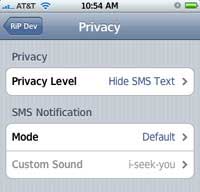
After installing Caterpillar Kate, the app creates a RiP Dev menu in the iPhone’s Settings that allows you to tweak your Privacy Level.
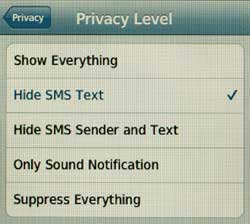
Here’s a screenshot of the Privacy Level options:
This is what an incoming text message looks like when you choose to “Hide SMS Sender and Text”:

“Hide SMS Text” looks like this:

Additionally, you can adjust the SMS notification mode to: Default, Silent, Vibration Only, or select a custom sound.
If text message privacy on the iPhone is a concern for you, you might want to purchase a subscription to the Caterpillar Kate app. The software also has other cool features, which I’ll review in an upcoming article.
My boyfriend and I sent private pics via iMessages. I have an iPhone and an iPad. I deleted the pics from the iPhone but my daughter played with my iPad a while after I deleted the pics on phone. She went into messages and saw te pics, as they were not deleted on iPad. I need a pass code to open message app not a pass code for phone or iPad as such. Just a pass code to open message apps.
I totally agree!!!
Again, Apple fails! They really suck but most of the public adores them…WTF. My HTC kicked ass over this f’ing iphone, or should I say….fphone (fail phone)! Basterds! I F’ING HATE APPLE!!!!!!
dude isnt it just bullshit to buy a app called kate to hide just your text messages
its a simpy feature for the iphone
why is there not a easy app or setting?
dude i just want to fucking hide the name of the text messager man:S:S:S
I want to disable this also but don’t wantvto jailbreak my phone! BUT XXXX if you have a wfe… You shouldn’t have a girlfriend! 🙂
my wife looking at myphone for the time, saw a text from my girlfriend- point proven.
RipDev is no longer in buisness (see their web site). Did anyone pick up this application?
Can someone guide me why on my new 3GS I the WI-FI cannot work.
Since the 3g iphone (i never had the 2g) you could have just locked your phone and the text messages would not have appeared. The 3gs now have an option to just display the name of the person texting you. Apple has fixed this issue! yay!
Hi! I was surfing and found your blog post… nice! I love your blog. 🙂 Cheers! Sandra. R.
Is it possible to Show also the contact Icon in the SMS preview?
is there any way to get a password for just text messages?
I will take a look at thoughs programs metiond by ethernium57
you have to jailbreak your iphone then go in to the installer that is put on it and you will find it there
HOW I GET CATERPILLAR APP ON MY IPHONE
Use the MCleaner app — its only $20 ONE TIME and it does far more than just stop the SMS popup… you can schedule specific times for when specific people can call you, etc.
Also, a program called ‘PYSL’ will turn off SMS preview and its FREE. There are other functions within PYSL (protect your secret life) but they don’t seem to work too well — but the SMS preview toggle works fine.
where can i get that app? im dying for that!!!!lol