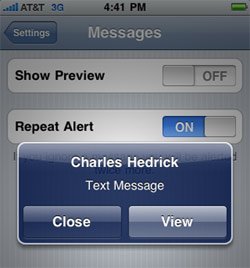
One of the problems I used to complain about most was iPhone’s “SMS Preview” feature, which prompted you with an excerpt of any incoming text message you received. You can imagine — or maybe you’ve actually experienced — the awkwardness when a raunchy text message from your significant other pops up on your screen while a relative or coworker is using your iPhone.
SMS Preview and the lack of text message privacy on the iPhone caused embarrassment for a lot of my readers, who left comments about inappropriate text messages popping up on their screens at the worst times — pretty funny, you should go read them.
After TWO YEARS of complaining about this extremely irritating issue, Apple has finally heard our pleas and given us the option in iPhone 3.0 to turn off SMS Preview for incoming text messages.
Just go to Settings >> Messages to turn SMS Preview on or off. That’s it, no more unnecessary text message drama.
Update: Mark writes,
I do not agree that this solves the problem. I actually think Apple needed one more SMS privacy preferences option to completely suppress pop ups for text messages, don’t you? Complete suppression of text messages would be I don’t get any popups about any text messages if desired.
I agree. I noted this as a concern in my post 6 iPhone Privacy Issues You Should Be Concerned About.
Question…if receive a late text message on Iphone will it still contain original date text was sent?
@Newbie Air plain mode actually DISABLES all incoming text messages so it’s true no one will ever read the message… Including you because it will never arrive at your phone.
I agree, I don’t want any text notification to appear unless I am in an environment that I want it to appear…apple is missing the point…has anyone heard of ashley madison website, cheating and flirting is reality and your phone should not jeopardize whatever you decide you want to do…period. Apple needs to fix it or an app needs to be developed to allow the user to control them. Does the airplane mode stop the text message from popping up?? That seems to be the best work around for the apple flaw.
This is exactly how Tiger Woods got busted. Just disabling the preview is not enough to consider it secure.
Like Troy I recently exchanged my Blackberry Storm (2) for an iPhone (3GS). I actually sent the Storm 2 back to Vodafone UK after it dropped 15 calls in a day when I (trying to) phone clients…embarrassing and unforgiveable, and after some research I discovered this problem is apparently one of the reasons why Vodafone UK are no longer offering the Storm 2. The Storm 1 had a problem with occasionally dropping calls but the Storm 2 took it to another level which made it unusable for my work. I’ve had the iPhone for one day and although you can get some great gadgets in the Apps store I will be going back to the Storm 1 (despite it dropping the odd call) because the iPhone has two major failings:
(1) The lack of privacy with there being no way to turn off SMS text message pop-ups – hiding the text of the message is just not good enough, and not just for people with lots of girlfriends to worry about. If I’m in a meeting with the phone on the table I don’t want my colleagues / clients to be able to read incoming texts, OR who they’re from. Period!
(2) No way to get a delivery receipt for SMS text messages – hello? What planet are Apple’s developers on?? My Nokia 8210 could do that 10 years ago!!!
Apple, if you’re reading this, DO SOMETHING.
Here is the letter I just sent into APPLE regarding the issue I had with the SMS pop up screen coming onto my phone….
This is an incredibly serious security issue. I am surprised no one has made multiple apps to get rid of this annoyance….
“My Email”
Well I just spent 700.00 to apparently UPGRADE from my Blackberry Storm to the Iphone 3GS. I have a macbook pro so it just seemed to make sense.
Anyhow I am thinking I may return the phone and hook up my Telus Blackberry again.
The phone is great, I am very happy with all the features, apps etc etc.
However, there is a HUGE HUGE HUGE SECURITY ISSUE with the fact with the TEXT MESSAGE POP UP.
I am currently applying for other work and had my new IPHONE on the desk.
Although I turned off the SMS Preview it still shows who the text is coming from and the fact you have a text.
My boss was walking by my desk while I was not there and had my phone on the desk and the phone buzzed. He then looked down and saw it was a text message from our main competitor.
Hence loosing my job……
Any correspondence with our company and a competitor is grounds for dismissal seeing as the informations that we know is highly classified.
So I would like to say a big huge THANK YOU!!!! For helping with the loss of my job.
This is incredibly serious and will definitely have a Lawyer looking into this.
I would highly suggest that you do something about this issue before you get some type of class action law suit on your hands.
Again I will be returning the phone for my 700.00 back and then go back to the Blackberry that holds business information very highly highly secure for their users.
Thank you again sincerely for the loss of my job came at such a great time with the economy being so bad and all!!!!
Disappointed,
Troy
Apple please please change the setting where we can also hide the text MSG sender. Just the content is not enough
When will we have privacy i want to be able to lock apps and my msg i want the option to possibley lock my phone and put seprate codes on everything else on my phone! When?
Unbelievable. Total lack of Privacy, I just don’t understand how this was possible on Apple’s minds, but I do hope further updates will solve this issue, allowing to totally hide things popping on the screen when it’s locked. This is software, so it’s quite easy to solve it, without relying on third parties, and extra money, to solve it.
Mr. Jobs, please… do it!
After the update my text messages automatically delete. If I close the text & open it back up it’s gone. {I have the first generation}
I can assure you this feature was available in 2.0, which is when I found it, so it could have been available sooner. The option to turn it on used to be under Passcode Lock which was completely confusing. I only found it when I went to add a lock on my phone, and low and behold it gave me to the option to turn off SMS preview text. On 3.0 this option has been moved and is what you’ve recently discovered.
In one of Apple’s earlier updates (2.1, I believe), turning off SMS preview resulted in a simple pop-up of “Text Message Received” or something like that (no sender name). A later update (2.2 or 2.2.1) reverted the behavior to showing the name but not the text message. Better than nothing, but like “Irritated…”, I don’t even want the senders name showing up.
Irritated iphone user,
change the names of the people whom yu dont want others to know ab. just keep yu a list of the peoples real names with their cover up name on the side. for example i use damarcia for damarcus! =) hope ive helped!
@Irritated Understandable. Thanks for your comment. I agree, it would be nice to hide the name, too.
I’m sorry but this has NOT been resolved. I updated based on your misleading article and discovered that it still shows a text has come in and from who – it just doesn’t show the text content. Which, by the way, you could do before by putting on the pass-code lock. This is not good enough. It should be OFF entirely. I do not want it known who I am getting messages from. Plain and simple.
@Kelly Didn’t realize, thanks Kelly!
This ‘fixes’ one problem, but creates another. I liked being able to hide the text of the message while the phone was locked, but show it while not locked. Now in order to hide when locked, I have to hide always and when I am in safari or another app and a msg comes in, I can’t tell if it is important enough for me to exit my app and reply.