Update: The SMS Preview privacy issue is now resolved as of the iPhone 3.0 software update.
In my original iPhone review, I complained about having little privacy on the iPhone when receiving incoming text messages.
When you receive an SMS message on your iPhone, a preview of the message content pops up on the screen, and you can choose to either view it or ignore it. While this “SMS Preview” feature may be very convenient, it could be troublesome if a friend or family member is playing with your cool new gadget and a message you’d rather have remained private pops up on your screen — ouch!
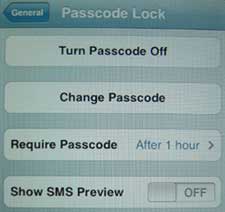
Well today I was browsing through the iPhone Settings menu, and I came across a “Show SMS Preview” ON/OFF button. The only problem is, the option to turn off SMS Preview is available only when you set a Passcode Lock for your iPhone via Settings >> General >> Passcode Lock.
Since I’d rather not have to deal with entering a password every time I want to use my phone, I set the Require Passcode field to “After 1 hour,” so that I’ll only have to enter it at most once an hour. Really, though, I rarely go 60 minutes without using my iPhone for something, so I’m hardly ever prompted for a Passcode.
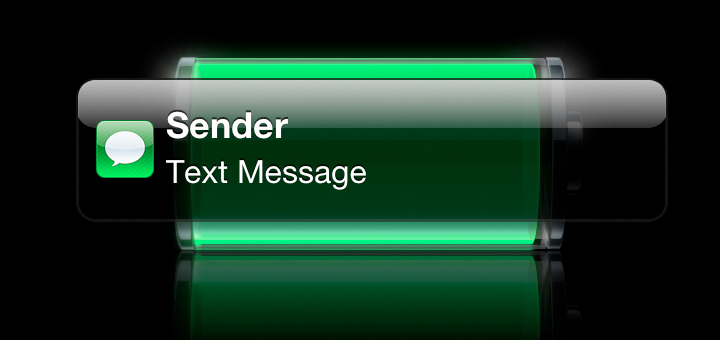
Now when I receive a text message, the iPhone displays the name of the sender and “Text Message,” rather than an excerpt of the message content.

I’m glad to have discovered this option, but I would really like to be able to turn off SMS Previews on the iPhone without having to set a Passcode Lock. What about you?
New: Has SMS Preview gotten you into trouble? Share your awkward or embarrassing stories here.
Update: A third-party app called Caterpillar solves iPhone’s SMS privacy issue. Click to read my review of the Caterpillar app’s Privacy feature.
how do you do this on iphone5s
Nvm… Found it. Thanks.
I tried everything… There is no show preview option in my messaging settings or pass code settings. Anyone capable of helping me fix this matter? I don’t mind the pass code cause I use one anyway.
How do you do this on iPhone 4s?
Ho all u don’t need a work around go to settings notifications messages and click show preview to off. It will just show name and say text message. Spread love x
This used to be the way I could turn off SMS preview on my iPhone 4 but after doing the ios5 download it is in settings then notifications then select messages then turn off preview.
Awesome!! Thank you!
I can’t mine to work, it still shows the mess . Any suggestions to get this sorted.
For ios 5.0 go to settings>notification>messages and make your selection there.
i cant receive text through my phone,why?
For the iphone 4 you can go into “settigns” “Notifications” “Messages” “Show Preview” “Off”
OMG Thank you soooo much I just got an iPhone for the first time and I was like man oh man I better figure out a way 2 get this 2 stop if not I’m gonna have 2 return it cuz I don’t want everyone seeing my msg as soon as it comes through on the screen that is supposed 2 b locked so people can’t see my stuff :/ Tnx again!
Thank you! Saved me!
iPhone 4 ..go to settings then notifications SMS preview option is there
I spent hours trying to figure this out. I went on google and youtube and nothing worked. Then I read your comment and it worked! You saved my life and for that I will always love you!
What needs to be done is come up with a private setting in text messaging with no extra cost to keep prying eyes out of your business.
If your jailbroke download iprotect from Cydia it allows you to lock any or all apps on your phone.I have the private things locked like photos,texts,emails.
guys , here is the solution
http://www.youtube.com/watch?v=rZDXpiJVGiE&feature=related
No pass code required… just go to the Messages options, and first option at the top is what you are looking for.
NOTE THAT THIS IS ONLY A PARTIAL SOLUTION. This setting will only disable SMS preview when the phone is _asleep_, i.e. it is _locked_. So, it solves the privacy issue when you phone is lying around unused.
It doesn’t change anything when the phone is awake. I.e. if you are currently using your phone, the SMS preview will popup as usual, regardless of this setting. If you give your phone to someone else to use (like to you child to play some games or to your spouse to take a picture), they will still see the full preview of the incoming SMS message, regardless of this setting.
In other words, iPhone offers no solution for this SMS privacy issue. The only way to solve it is to use some third-party app.
hi sorry but i couldnt find the show sms prevew
I too would like to have the senders name deleted from SMS alerts. Has a fix been discovered for this?
I think the guy that sold me my i-phone is reading my texts via third party. He is a friend of mine, and since he sold me my phone, has all of my account information, including mother’s maiden name, social, etc. He knows things that I haven’t told him; things I’ve only discussed with a friend of mine via text, and she doesn’t even know him. Is there a way to block a third party from being able to read your text messages without your knowledge? I really need help here! Has anyone had this happen to them? Any help on getting this stopped would be appreciated!
this is not resolved. there is no way to turn off the notification with an iphone 4 with using 3rd party apps/jalbreaking
Hey I was wondering if their is an app or setting I can use so when I am texting other people can not see what I am saying. So it looks off or black to them but it is clear to me? If so please reply to this. Also, let me know if the only way is to get the screen protector that does that.
I just resolved this issue with my iphone4. You have to jailbreak your phone. Then theres an program called iblacklist that you can get through sinful iphone repo. Download it and you can customize your settings for text messaging, phone calls and lots of other stuff. Works perfectly!
my iphone 3g used to say text message recieved now it says message and i dunno why :/
I know,
It totally sucks that it shows up the text message has arrived and especially from “whom”.
It’s my biggest concern… It shows the name of a person from whom I got the message.. (I should get an option to hide that name)…
On BlackBerry I used to just get a notification of new message text / email and that was good enough for me… as that way I never faced any embarrassing moment in front of my new girl friend… (especially any message from my ex) causes an issue…
Did you ever figure a way to keep the name off the sms when it tells you there is a message? Mine used to just show the phone number for facebook if I got a message from that, but now it shows the person’s name. TMI!
Hey Marilee,
No I am still waiting for Apple to come up with an option to hide the name of the Person… instead just show… “New Text message”
If you don’t save the number… then it will show the number on the screen… If you save that number as a part of your addressbook then it shows that name…
Only thing I can do now… is rename the person to “News” / “Info” / “WeatherNetwork”…
But I hate as this makes my life horrible…. when someone calls and see the name “WeatherNetwork” 😀 😀
i would like to know how to put a password on my text messages so nobody can’t go thru my txts with out puttin the pass code can somebody help me out to show me how to put a pass code on my text message thing i know blackberry has this option i don’t know if apple subscribes this to there customers….
If you have a jail broken iphone just download IBlacklist there are setting in there to allow this…
i think u need to download a app that says ” get a life ”
I have version 3.1.2 and the above option seems to have been moved from ‘General Settings’->’Passcode Lock’, into ‘Messages’->’Show Preview’.
Also the disabling of the preview is now not limited to the lock screen, another bonus 🙂
You can stop part of your text coming up turn the preview off in the message settings you don’t need to use a passcode for that I do that but I like and prefer passcode for extra privacy
Faketext is a hot new app that allow you to hide your real text messages on your iPhone. Check it out at faketext.com, you can go there straight from your iPhone since it is a webapp and is free.
There are certain people that send me pictures I’d rather no one see but everyone else who sends text messages is fine. I wish there was a way to just turn off photos completely for just certain individuals …So, the text part of the message could come through but the photo would not. Does anyone know if this is possible …or in the works for iPhone development? If not, it SHOULD be. It really doesn’t seem for how advanced the phone is, this would be very hard to do. Just writ a script for the phone that says “sender XYZ = block all incoming SMS photos” There, I just wrote your code for you.
Can you see the amount of texts made to a certain person from 3GS? i.e. Texts to mum = 53
texts to Dad = 103
I really think that there should be a password lock on the messages, as well as the phone. Sometimes people are going through your phone and you don’t want them to read your texts messages. There may be private contents that you don’t want people to read. If there was something like the phone lock on messages, the iPhone would be perfect!
Settings>Messages and the setting to turn off preview is there, no need to use the passcode if you dont want to deal with it
hi fellas!
i got this problem that i dunno how to solve.
D issue is my iphone 3G fw3.0 doesnt display names on my messages..
as in, messages pops up with no names rather it pops up with numbers like +76352 blah blah blah instead of the real names in my contact..pls i need help ASAP
Thanx
Since the private text messages are only a small part of all the messages you are using , treat them differently . Use the new PrivateTIP application for iphones on app store , with this application you are hiding the text message in an innocent photo from photo library , you can then store back the photo with hidden text to photo library , you can send the photo with hidden text by email to a friend . The text can be extracted only by the application which is protected by password . Read more on http://www.adj-soft.com .
THANKS FOR THE HELP!!!
Apple definitely needs to solve this issue.
In the meantime, congrats for finding the solution Chris!!
No, it’s not perfect. You still get a push notification on your phone as soon as a text message appears. So if you’re showing someone photos on your phone, for example, you’ll get an alert that you have a text from so-and-so which you are given the option of either ignoring or viewing. Either way, you have been interrupted. I’m just amazed that his still hasn’t been provided as an option to turn of if you desire.
Don’t know if I’ve missed something but you can do this on the 3.0 software. It’s just they’ve moved it to under, settings>messages. Works perfect.
Has this been reversed for ver 3.1? I have just got on board with an iPhone and the option does not appear?
Just put your phone in AIRPLANE MODE when people are around. The phone can still be played with curious people and you can guarantee no naughty texts or calls will come in. Works as a temp fix at least… Just turn off airplane mode every so often to see what you missed when you are in the bathroom or something. 😀
sounds like you are married and u have secrets lol…
Thnx For da help U rox.
Damn this option isnt available in 2.0
Hey “private”! Read all the posts first before adding your comments. The subject has been discussed already and it is not only about cheating but also about professional data beeing exposed, about your boss reading your wife’s sms that’s says she wants to give you a blowjob when you come back home and other stuff like this. The reasons could be many and if the only reason for you is cheating on somebody then probably you have a big problem being honest. Consider this and stop posting duplicates.
Seriously? My iPhone isn’t the catalyst of the openess in my relationships with those in my life. However, I have conversations with people that I would prefer to keep private from time-to-time. As well, pop-up interrupts my work frequently when I’m using my iPhone to show a client a sneek-peek at my portfolio. I would much prefer not having to have people interrupting a conversation I’m having with their texts. And, what if that text is coming from a prospective client’s competition? How does that go unexplained? I wonder if I should be curious about my wife’s iPhone as well? You bring up a good point, maybe SHE has something to hide as well? Or is it only men that cheat in your world?
I have an issue with all you people that need to lock your phones and “secretly” text what did you all do before these “wonderful features” ?? …. You have trust issues and should not be with the people you are with if you need to lock your phones.
What are you hiding ?? and if you women out there have husbands/bf locking their phones … you should wonder why ????
I agree, hubby guards his cell phone with a passion. He’s receiving messages from women he shouldn’t. Papers should be arriving any day now. Bye-bye to the louse! Even though I can’t see the text messages he sure left one long paper trail.
Uhm… I need password.. because… well, when my iphone is at the boy that i like and he “accidentaly” sees the message about him, i’m lost! xD
if someone steals your phone, it is best to have it password protected. the only way the thief can use your phone, is if they have apple unlock it and that sends everything back to default; therefore, all your facebook accounts, bank accounts, emails, etc. are deleted.
I think some people should stay on the subject and mind your own business. I f someone is cheating that’s their business and life. 🙂 having said that! I need to have the name popup removed from my Iphone 4. Can some one help? would it be possible to get that done without jail breaking the phone?
diana is a loser. she doesn’t even have a boyfriend. she’s pretending, it’s all in her head. she doesn’t even have an iphone. diana is actually a man. he/she is crazy in the head.
This whole privacy thing is a major issue, Apple are clearly not listening to their customers.
They have a fantastic product but need to take a closer look at Nokia and the additional phone settings they offer.
i have d original version of the iphone and suddenly i noticed tat i can send messages and it sucessfully reaches the person i send it to but i cant recieve their reply.. i cant get their reply …plz help me out i am totally confused what do i do?
I have 3Gs. I was playing with my txts and noticed there is an “edit” button on the top. If you push edit button, you can erase some txt and leave the others, so you dont have to keep the whole conversation…
damn… today my gf spot my ex sending me an sms. now i have 2 ex. 🙁
I’ve read all these posts, and need a solution because I have a girlfriend (only 1!), and a 7 year old son who I like to let use my new iphone for the games… BUT:
My god, who’d want to be married to or dating Diane or UNKNOWN.. I mean they’d always be checking if you’re cheating! You’d never get to use your phone because they’d always be on it in your messages…
Hi. Im Renee im doing a project on iPhone’s . got any infoo for me (:
i had a blackberry and i’m considering going back to my blackberry curve!!! one of the best phone i ever had. it would run for days without me charging it so many times and there is no pop up freaking notification annoying me when im browsing rather a light blinking!!!!!!
I think Diana is crying now. . . . =o( .. . . .
yeah… iblacklist… 😀
it is great, no more sms notification!!! 🙂
in addition you can install notifier for minimum notification without any popup.
P-squared…we feel your pain!!! It is sooo frustrating!! I was hoping the new software would fix this problem…but NO!!! I was thinking about getting a new iPhone but I’m so frustrated about this one issue that I may consider buying a Blackberry instead!! Ugh!!!
I get a text message pop up when I get a new text message in the middle of something i am doing! I just want the little red icon notification and no text message pop up. This notification pop up is sooooo damn annoying that it makes you want to break the iphone! i just want an option to turn that pop up screen to be off! is that too much to ask? a simple red icon with a number indicating text messages received in the text message app would be greatly appreciated!!!!!!!!!!
Rita,
I just downloaded the new software and I found the option under settings, then messages.
Jess
Hi Rochelle,
I just got the iPHONE 3GS. I am very new to iPhone.
I have software version 3.0 and I can’t see the slide to turn off SMS Preview. There is no option to do this so I am unable to disable it. Any words of wisdom?
-Rita
All u have to do is download realSMStext and iBlacklist off of cydia and u can hide just about anything 😉
people are complaining that they cant put it on without putting passlock on , well simple solution , keep a pass lock on , its always handy to have it on coz …
1. if you mate robs your phone trying to read texts he cant
2.say you loose your phone (touch wood you dont ) but then someone cant get into it and rack up you call bills
3.if none of the above is going to happen and u still want the feature of no text preview then just set the pass lock as 1111 then its much easyier and you get what you want
this trick works only if your iphone is not active, if you or anyone plays with it an sms will show up as usual – the whole text word by word…
Brilliant mate! thanx a lot!!!!!!!!!!!
there is an APP lockdown in Cydia but to get this APP you have to jailbrake your iPhone first, than install cydia and than in cydia find lockdown. with this APP u can set passcode on every APP you want (sms, email, phonebook, etc.)
THANK YOU THANK YOU THANK YOU!!!!!!
I’m not too fussed about the preview but I would prefer if I could put a passcode on my inbox, I don’t have anything to hide but I don’t like it that any one can read all my messages from my partner or who ever. Is there no way of just having a four digit lock on the SMS function?
Just got an iphone, so annoying having name of who text message is from. And no time date on some txts, and the ablity to not delete some txts from the conversation! The other annoying this is it doesn’t tell you how many characters in the txt, so hard to tell if you’re going over 2 txts. Also, can txts be forwarded?? Previously had a smartphone, it had much smarter txting functions. I’m glad that there’s software on this ph, cos hopefully these things wil be fixed without having to buy a whole new handset????
Hey everyone there is a 3rd party app(means you gotta jailbreak) that lets you block it. Its called iBlacklist. When you install it, it will say its unregistered but it will still work. You can turn the notification off and then it works just like email. Whenever you get a text, just a number goes up by SMS instead of a notification showing the entire message. Hope this helps!
Diana and unknown (also probably diana):
No one here has to justify their reasons to you. You are the one who needs to get a life.
But to show you that it isn’t about cheating as you claim, I had to call my boyfriend to tell him not to message me anything racey because I had little cousins playing crash bandicoot on my iPhone at a family reunion. I spent the whole night paranoid.
So calm the f@@k down, you make us women look crazy.
Thanks just what I was looking for, private once again.
Thanks so much! i really needed this and i didnt know what to search up but as soon as i typed iphone sms privacy it came right up. thanks again!
This problem is so true. Apple need to revisit the text app and re-do it. Make it simple – too marly of an app.
I have the same regression complaint with regard to the latest software that doesn’t just say ‘New Text Message.’ Irritating…any update?
Thanks – perfect advice
I agree! I have sent a complaint about this, but you are right, it seems that updates should be exactly that. This version seems as if it backpeddled a bit with some functions! I am sure that we will have a new version coming soon that will hopefully address this issue. Is there a certain time span or criteria that these new versions are released? Or is it just until they are tired of hearing everyones complaints?
Just updated my Iphone software to the latest version 2.2 and although with the SMS preview in the “Off” setting, the name of the SMS sender now shows up without showing the SMS message.
In the last software version, when SMS preview was in the “Off” setting, and the phone locked, the message flashed up was “New Text Message” – which is preferable….Weird how Apple forgot what the previous software version was doing !!
I have just recently updated my 3G and before this update when I recieved SMS, the bubble stated NEW TEXT MESSAGE, and only that. Now after the update, it states the above and the sender. Does anyone know how I can not have the sender’s name pop up and simply state NEW TEST MESSAGE?
THANKS!!!
I had my iPhone set up so SMS preview was off and you also could not see who the person that sent the text was. It simply read “Text Message”. Ever since the new update (2.2) I can turn SMS preview off but the name of the sender shows up! Can anyone help me out?
It’s irrelevant what someone’s reason is to not want the SMS preview to pop up, and all of us apparently have the need, as we’re all on this page. Anyway, if anyone figures out a way to eliminate the preview on a 3G altogether, (the pass-code lock option is lame) without jailbreak, please share the secret.
Thanks
I don’t like this major bug which apple seem to be nothing about. Why was this issue overseen prior to the release? Or is this a feature to cater for the look at me generation who have decided that privacy issues is trivial and not important (facebook et al) its not that i’m hiding things its just i am a very private person and i don’t think its necessary to have my msg on show for the whole world to read. It’s a very important bug that needs to be fixed ASAP along with some of the other annoying discrepancies. I am starting to think that this ipod with a phone feature is a complete waste of time. Again another mac product that follows their mantra of “Form over Function” and the sad thing is i am now stuck with this phone due to being on a plan.
Hi,
Ii have the older version of the IPhone and I do not have the Installer icon on my phone, so I can’t go and fix my SMS issue. Attached is the link to the IClarified and the instructions on how to make your phone more private in terms of receiving SMSs in case you have the Installer.
http://www.iclarified.com/entry/index.php?enid=636
K
I often show videos on my iphone to clients and business associates etc. (I work in video production and the iphone is a handy tool to have – it IS my calling card). However, in the middle of a video I have had some pretty racy and sappy msgs from girlfriends pop up or stupid stuff from some of my punk friends! MAN, talk about embarrassing!! Luckily nothing too graphic thus far but I can’t be taking any chances. SMS preview is OFF on my phone 🙂
hey guys, I have the FULL solution…. email me at matematkovic@gmail.com
All the best,
Dear,
Can you help me send your iphone application to me for turn off “SMS” function, many thanks !
In Japan all the Cellphones have the ability to create SECRET folders, then you can make a “rule” for the setting to take certain addresses and attach them to the folder. So if you get a message from a person on the list, the message goes right to the secret folder and no preview or alert is given to you about the message. The little envelope icon will be shown but no alerts. When my Salaryman students got the new iphone they were completely shocked and awed that this expensive phone had nothing like this. Now their wives(settle down Diane) will know about their girlfriends. hahahaha. Personally I love having my I-touch. All the features and my battery will outlast yours because I’m never searching for networks….
Cant believe that are that many that want to NOT show sms as much as i do.
It has nothing to do with hiding anything.
Its my damn device, i want to not have by conversations in public.
I used to have a nokia phone and sms msgs could be placed into a sub folder. That was a nice touch. Really miss that feature on the iphone !
yeah, I’m a designer and I interviewed a photographer. My GF tested me “so was the guy any good?” my husband had a FIT! Took 20 min to explain- ended up showing him whole conversation between my GF and I ugh!
Kimmy>>> thanks, works for me perfectly. Only with PYSL. Free, easy.
Mmm, I don’t like the fact that any Tom Dick or Harry can see a preview of my texts, it’s not right. It’s like having the Royal Mail insist that all letters and parcels come in clear polly bags. I think we all have the right to huff and puff about this flaw in the iphone software. I wonder if it’s a breach of my Human rights. Mmmm
Or how about texting your spouse about birthday/holiday gift ideas and your child sees it?
unknown2u!!! You’re such a moron or narrow-minded. It’s not only about cheating. use your imagination. I don’t have to cheat on anybody. Simple situation: my kid reading a message from my wife (his mother) that tells how eager she is to do a blowjob tonight. Same thing in the office. I suppose my boss knows very well my wife does a blowjob but he doesnt have to read that. PERIOD. My wife signs up to this post…
You are bunch of shite faces. Most people here have a ligitimate large number of reasons why they need to hide the auto sms preview!!!! You make me mad!! Thinking of hiding them from my wife – that thought didnt even enter my head. It so happens that my wife may send me private texts on her lunch break and I dont want my work colleages at the desk beside me seeing that!!!!
And thats only one such reason.
s/I have/I DONT have/
I have a girlfriend/wife at the moment. I need my txt’s private. I am a data analyst for a medicare company and federal HIPPA laws require any sensitive info be pw protected…simple as that. I cant have someone msg me a members name and have it show (not likely to happen, but could). This “feature” definately is bad. Does the psyl fix work on v2.1 too?
Why does it matter what peoples reasons are? It is your business. I work in a industry that is VERY cut throat and can not afford to lose any info that was meant for my eyes only
diana – i think you are a paranoid madwoman.
who said they were hiding their texts from their wives/girlfriends? nobody. you just assumed that is what people meant.
what if i am receiving sensitive information about my wife’s pregnancy – and nobody knows about it yet – and i am showing a friend a youtube video on my iphone?
i don’t necessarily want him to see “It’s a boy!” before he even knows she is pregnant.
there are a million other innocent reasons why this would bother people.
your idea that it is simply based on trust issues with a wife or girlfriend are truly delusional and scary. i am willing to bet you have been cheated on before, and now you relate everything in the world to that experience.
sad.
Here is my solution, only works with jailbroken iPhones though (my phone is 1.1.4 firmware). Go into installer, install a program called “Pyslâ€,then install another program called “taskbar notifierâ€, now reboot your phone. A new icon for the Psyl program should appear, run the program, set “pysl enable†to on, then go into settings, where it says “sms pop upâ€, press it to on, now press the home button, reboot the phone once more, now hopefully when u get an sms you’ll get tone/vibrate, a number will appear above the text icon, and a small bubble will appear in the status bar, no pop up should appear. works for me. Good Luck. Kim.
I suggest people use the feedback form at Apple –
http://www.apple.com/feedback/iphone.html
Flood them with complaints, they’ll fix it. Other than that and multimedia messaging it is a brilliant device.
And if the dopes have no clue of what privacy is yet, then you need to think before you open your mouth and make a fool out of yourself.
Please somebody find a fix for this!!! My son saw a preview text message from a friend that was NOT appropriate!! I just got this phone and I really like it but this should be an easy fix!!!!
Diana, just because we want there to be more of a privacy issue does not mean that we are cheating on our spouses, etc… This is a feature that has been blatantly overlooked by Apple and needs to be fixed, asap. Personally, I do not want co-workers (or anyone else for that matter) knowing what I do in my private life. In particular, I have a friend who loves to tell me about his crazy weekends- do I want anyone to see this? NO!!! Good for you for being honest and what not, but that doesn’t mean you need to slam everyone.
It’s all been said already.
However, to clarify for some of the idiots that think that people feel that we’re complaining about rights being violated … it’s simply a matter of I want to be able to show my mom stuff on my phone and not have one of my brothers-in-law text me something my mom might not appreciate.
All I want is to hear a simple tone (selectable by myself) to let me know that I have a text message. There is already a number that shows up on the SMS icon letting me know how many texts I have that haven’t been read.
I can’t imagine that this is such a difficult feature. I also can’t imagine that there are many people out there that would have requested to have a preview of text messages if it didn’t already exist.
I’m not even going to question why we still don’t have Multimedia Messaging yet.
this feature will get you sucker punched like Bill… I’m glad you can turn that preview off because it is dangerous. You’ve got to set a lock and turn preview off.
If the wife asks tell her you have to lock it in case you lose your phone or someone at work picks it up..
and it really sucks that you lost you g/f over this bill…u should complain to Apple
i been trying to set my messages to private since i got the 3g, yesterday, i’ve tried everything that everyone is saying but nothing just works, i want my messages to always be private, i dont have anything to hide i just dont want everybody able to just look at my stuff. this phone really should have something as simple as a privacy mode that stays on. its supposed to be the best phone, but it has none of the REALLY important stuff like all other phones
holy crap you people are fricken morons. IF YOU DONT WANT TO CAUGHT THEN DONT DO IT IN THE FIRST PLACE!
There is NO INVASION OF PRIVACY because apple isn’t tapping into your phone.
You say not having a SMS preview on/off function is privacy invasion.
Hello dip shits…are you on drugs for fucks sake you’re obviously getting up to no good because you want to hide your secrets.
And I bet you’re all yanks too. So damn paranoid.
Think about what you’re doing BEFORE you blame someone or something, like the iPhone, or apple.
Show some respect for the amazing technology created by apple…for people like you.
AND GET OVER IT AND GET A FUCKING LIFE LOSERS.
I swear to god I just lost my girlfriend over this stupid SMS preview.
Brutal.
I think safeword has come up with the best short term solution! But let’s hope Apple hurry up and release an update to address this shortcoming – soon!
When someone wants to see your phone, or if it’s laying around, set the phone to airplane mode. This will prolong data until you get out of airplane mode. This is the best work around I can think of at this time… I feel you guys, trust me, this option can screw up alot of relationships.. Honestly, this is a real big problem and issue.. they need to fix this.. I paid alot of money for this phone.. I let my blackberry go for this phone.. Please fix this..
I change all my gf’s names to guy’s names + turn preview off.
Password is always on after lock.
Usually something wrong with my phone when people want to see pics. Haven’t had an embarrassing moment yet. Fingers crossed.
I dont want nothing to show up at all…IM a PIMP i cant afford for any names to pop up at all…someone help ya boy out
to clarify – Got the Exchange mail to work, however for security purposes, the phone mandates you set a passcode to operate the phone. The swap bar to open requires the passcode. Well I quickly got rid of my corporate Exchange mailbox. Who needs that pain to use the phone, six characters, including number and special character
The Passcode is alo mandatory for Exchange. That’s understandable, but a real pain every time you use the iPhone. Couldn’t the passcode be set to certain areas, like mail, or SMS?
Chris wrote: “Since I’d rather not have to deal with entering a password every time I want to use my phone. . .”
You could also try setting the password to 0000, or something similar that you can enter really quickly.
Jackie wrote: “The phone is so expensive you would think that it would have all the little think that other phones have like, privacy settings and speed dial for those number you use all the time.”
Thats what the “favorites” tab is for when you open the phone application. You can easily add/delete numbers as you need to and dial them with one touch.
I agree, Patrick. Like I mentioned in the article, there is the Caterpillar app which works really well for making text messages private.
But that is for a jailbroken iPhone. Maybe we’ll see an official app for this in the App Store next month. Thanks for your comment.
Yes you would think that people would want practical stuff on the iphone like this and privacy from email and photos also… I cant find a reason why no one is putting someting out… IT would sell big bucks..
the sms preview off function is only effective before you enter your passcode…it doesnt work when you are using the phone or at the home screen which is completley pointless because if I dont want privacy when my phone is lying around with a passcode… I also want privacy when it is in use.
Make sure the SMS preview is turned off.
Then go to General/settings/reset/reset network settings……………reset
It should work now
Sorry guys, just made it more easy to read
Steps To Disable SMS Preview
1. Go to the Settings Menu
2. Click on General (Diagram 1.0)
3. Click on the Passcode Lock Menu
4. If you have not enabled the Passcode Lock function, then you need to enable it by entering the desired Passcode number combination twice
5. Once the Passcode Lock has been engaged an extended menu will be displayed
Slide the SMS Preview switch to the OFF position to disable the SMS Preview function.
6. If you would like to disable SMS Preview but not have to enter a Passcode every time you use your iPhone, then a workaround is to set your iPhone to only require your Passcode after a given time, e.g. after 4 hours
Thanks for summarizing, Rochelle 🙂
The problem (not being able to turn off SMS notifications) becomes particularly annoying if one uses the iPhone to follow more than a few prolific people on services like Twitter. In this case, the issue isn’t a concern about privacy or a desire to hide anything from anyone. Instead the problem is that the iPhone becomes hostage to a constant stream of SMS notifications that interrupt every other use – music, email, calendar, whatever.
Diana, You are very high and mighty…. and self righteous, and not very polite.
What about when you kid brother is checking out your iphone and your glorious trustworthy boyfriend texts you with something personal and perhaps (dare i say) even naughty? Or do you have issues with that too?!
You shouldn’t judge people Diana.
Right now the only thing you can do is use Catapiler or what ever it is called to block SMS… And that is ok but I want to be able to block SMS and Email and SMS by putting in a passcode to be able to get to them. This way no one can see anything.. But for now Catapiler is the only one that is working for blocking SMS nothing more and to me that isnt worth the money yet it takes to pay for Catapiler.. IF you want to know anything else let me know
I want to disable all SMS notification. Period. How???
Just a Heads up!
On 1.1.3 even if you turn the SMS preview off, if ur phone is left on the home screen it still shows a preview. But if u put the phone on standby, eg. “Slide to Unlock” screen and you recieve a text msg, it will just show the sender. Apple really needs to fix this because it is a total invasion of privacy! almost as bad as a facebook inbox you forgot to log out of.
I had a Treo 650 that had this option. Best thing in the world when your seeing mutiple women…I mean…
My option to do this didnt work. I put in the code, changed the option to turn off sms preview and it still shows.. I have hard reset the phone and soft reset the phone and it still shows it when the message comes through.. can anyone help me.. I sent the note below to apple.. I think it would be great to have to put in a code (4) digits to get into my pictures or my sms or my mail.. that way it would keep them private.. I cant believe there hasnt been a hack or anything for this.
Can you please please please… put in a lock down like the passcode for every application.. like have a setting in General that says lockdown or what ever and have it be able to scroll through all the aps and be able to put a lock on it. So if I lend my phone to a freind to make a call he cant hit SMS icon and get right into my messages or main or photos.. this way if you want to lock it down (IF) you can simple put in your 4 digit code after you click on that app and then you get into it great… that would make the iphone so so so so much more private.. omg I would love it..
Patrick Conner
PLS!!!! I need this darn thing of,…, it is very frustrateing, just do like every other phone out there!!! it is simple,.. it is amazing how such a cool thing could be soo stupid!! I need privacy
Lighten up, Diana. We may also be planning a surprise party for the significant other.
maybe not…
Diana, Get a life, if we want to sneak around and hide or whatever its our business the issue been discussed here is privacy.
I think it’s about time Apple fix this.
Okay. So I have read the issues with Text Privacy. For all of you that have the IPhone- Do you think it is worth the money. I am looking at the new 16g, just not 100% sure if I want to spend that cash. However, I need a new phone and I would like to get an Ipod or ITouch. Worth it or not??? Thx!!
I agree! I don’t like these feature. It’s not an issue of my girlfriend reading my texts, it’s an issue of people still being excited over my iPhone (like in my office where I work) and them reading things they really don’t have any business reading.
after you change your settings turn your phone off than back on
You’re right ci.
The dang texts still show in full preview if you have the phone in use even with the preview turned off.
So, if someone is using my phone they’re still gonna be able to read my business! Darn…
I totally agree with Christian! I actually already wrote in to Apple about this issue. I think a small icon appearing would be MUCH better, rather then showing who is texting or WHAT they are texting! That was something I immediately disliked. I hope that is in the next update!
Is there a way to contact Apple to let them know a ‘SMS preview off’ feature is something we want?
I agree with everyone. The most annoying thing is when one of my children pick up my phone and can see the entire conversation between me and whoever!!! i dont understand why there isnt an option to change the view of the conversation at least. Who cares about the ability to move the icons around. WHAT ABOUT PRIVACY!!!!!!
The phone is so expensive you would think that it would have all the little think that other phones have like, privacy settings and speed dial for those number you use all the time. There are many steps you have to go through just to dial. I kind of regret buying this phone.
personally I think the whole texting thing is evil. You people out there that have to lock your phones from people texting you shows you are not trusting to your wife/gf. I leave my phone out for my bf to look through because I have nothing to hide. If you have to lock your phone or keep texting secretive, obviously you have trust issues or you are sneaking around.
i find the MOST annoying thing and the best thing is having the whole conversastion saved. my boyfirend lives away so we contact alot by SMS. you can easily fill up your message box with whole conversations. i would love to be able to just delete some messages like “good night” and keep others like on all other phones.
does anyone have any idea if this is possible with deleting the WHOLE conversation???
thanx in advance.
C
This method only partially works…meaning if the phone is unlocked and in use you still get the full text message preview/notification
hey dude! how can i lock text message inbox ? as i do in my motorola… … is there any way to lock text message inbox and outbox without lock al the iphone aplications?
DEFINATELY they need to make the previw/name only/whatever pop-up go away, or give us the option to turn it completely off. Christian is def on target. Even with the message off, I still don’t need others knowing everyone who is texting me. That one time it happens and you don’t want it, you’ll become a believer.
the preview thing helps…
but really anyone can just accidentally
hit messages on the touch screen and read
a whole conversation with somebody
and i dont like to have to worry about that
i wish you could just lock one application like
on motoraolas i can just lock my texts
it woul dbe a lot easier
this is proving to be a particularly dangerous privacy issue…
I may be showing someone an internet page or map details and suddenly the partial message pops up with private details.
even tho the passlock can be turned on, it makes for a pain in the neck extra step when turning it on.
I really hope this gets attention in the next update and that only a small icon appears informing you that you have a message rather than posting it for the world to see when your showing off your iphone.
Nice find! Now if only they would add an option to turn off the ‘SMS sender preview’… Or ignore/deny incoming SMS from certain numbers? Then I would be happy. Just add all the numbers I don’t want to a contact named ‘Annoying Texters’, and set that one to ignore… Or perhaps, a nice feature would be a whitelist, where I add the numbers of people who I do want texting me, and deny the rest of the world! Peace at last! No more “Free Messages”!
Thanks for the tip!!!!
Sorry to hear that,it was working before the software update,I know because use to set the password feature before my wife started asking why I lock my phone ,lol . Well maybe Apple inc. will fix this problem along with other short comings of the iPhone if they ever get off there over priced lazy tails. Strike that last part,I don’t want them to think I’m slandering them, As if.
Thanks Dimitrios, but actually I tried that just now and the SMS Preview feature did not remain off.
There is a work around, enable the password lock feature then turn off preview. then turn off the password feature, the preview feature will remain off.