I’m going to start an iPhone Q & A series, where I post some of the questions readers send me by email. Today’s question:
Kathy writes:
is there any way to make iphone ring longer?
How to Make Your iPhone Ring for 10 Seconds Longer
The iPhone’s default ring duration is 20 seconds. To extend your iPhone ring to 30 seconds:
- 1) Dial *#61# and tap Call.

- 2) Note the phone number shown on-screen.
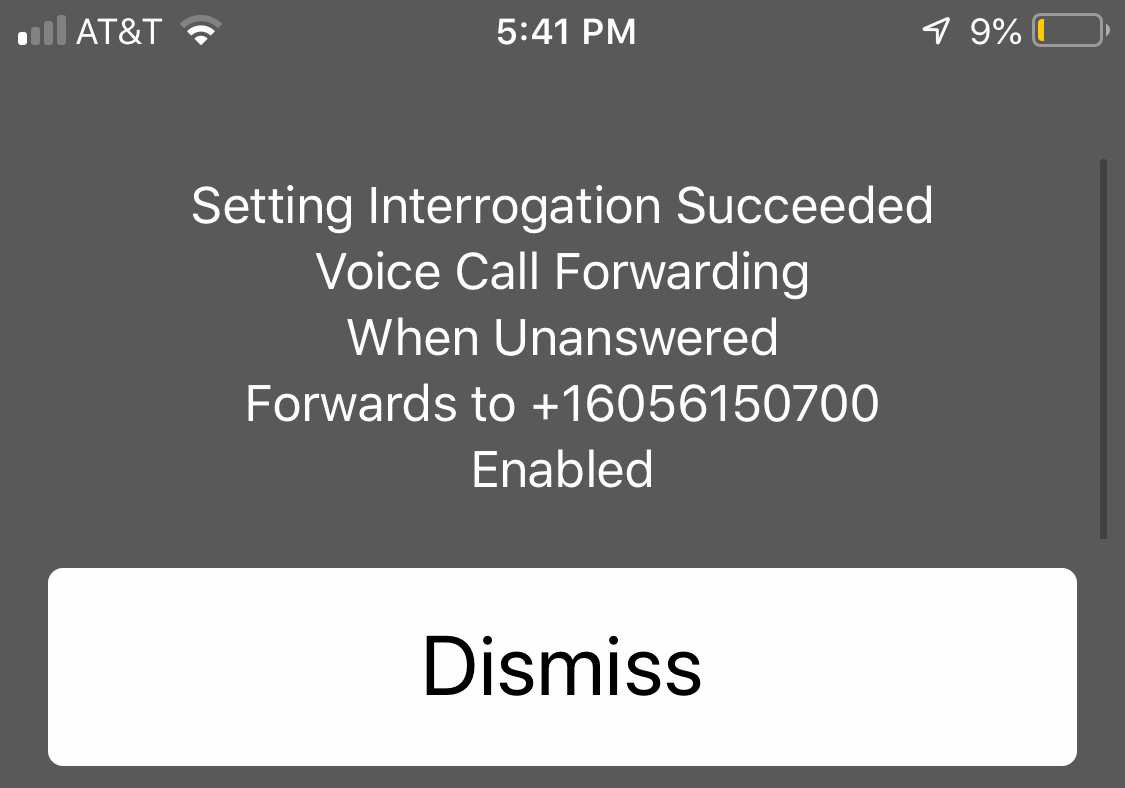
- 3) Dial in a continuous sequence: **61*, the number from step 2 (not including country code) then **30# and tap Call.
WATCH: The exact steps to follow to extend your iPhone ring duration
Your iPhone should now ring longer — that is, for the full 30-second duration of your ringtone. To verify that your voicemails are still being sent to the correct place, repeat step 1 and check that the phone number matches.
Update: People are reporting mixed results in the comments below. Please feel free to let us know in the comments how it went for you, and lend a hand to a fellow iPhone user if you have a tip to share based on your own experience.
it worked!!! thank you for posting this!!
*61*+ then the full number given on the screen**30#
Enter in one sequence
Hope it works from Telus customer
“The number or code you have dialed does not work” as of 9/28/2019, with SPRINT.
Didn’t work for me
Does not work. My carrier is Sprint. Very frustrated. Guess I’ll give up and run faster when my iPhone 6s rings
Instead of an 11 digit number I get 121. If I enter my phone number which is 11 digits it’s says invalid?
I have done this but now calls go direct to message bank
Many thanks, it worked!
It worked! I watched the tutorial because it didn’t work the first time and it was because I entered the phone number wrong. I have a 7Plus and use AT&T…
I’m glad to hear it!
I tried to make ringtone longer on iPhone 8plus supplied by sky and there is no way It will let me do it no number comes up ? Please can you help me
How to reverse this option so you can receive voice mail on my phone and not on the number I wrote down. This did not ring any longer than the 20 seconds on my iPhone x
It did not work for me. I did the 61 number but it did not succeed. It just said dismiss
Worked great now have 30 seconds before goes to voicemail-thanks
Worked! I had to do it twice though. Thank you!!!!
Worked hard at this ! but still not ringing longer.
this did not work for me either. I need more than one ring!!
Can you get it to ring for longer than 30 seconds, say for 60?
That worked thank you been trying for ages,looked on other sites could not work it out ,your explanation was nice and clear ,so even an old fart like me could follow it.
Thank again.
Does not work
It worked for us exactly as described. Did *not* include the + before country code. I question if country code is required at all. But not in the mood to experiment. THANKS!
It worked, I’m so happy!
This didn’t work! After dialling the number (with or without the plus sign) A message played that the number was incomplete and incorrect. I tried a few times.
I tried it today on my iPhone 5s with Tracfone Verison service and I got an error message saying welcome to Verizon your feature update could not be processed.
I tried it today on my iPhone 5s with Tracfone Verison service and I got an error message saying welcome to Verizon your feature update could not be processed.
There MUST be a simpler way to change the way the number of rings could be set. Surely the Apple “ geniuses could come up with a better system. ( of all the fancy stuff on the phone, this is ridiculous)! ! I’m not even going to try. Guess I’ll continue to “ break my neck “ trying to get to the phone on time, and my callers will continue to feel I’m avoiding them. Thanks, Apple !
Does not work
Called*#61# and got this number no good
Mine worked! I’m using AT&T and I have an iPhone 8. I made my own ringtone and it works perfectly! Thank you soooo much
The method to extend ring time on my I phone worked perfectly.
does not work
I just tried this and my phone now rings for 30 secs but unanswered calls no longer go to my voicemail so a message can be left. Can you help fix this. Thanks
This is ridiculous and so annoying. Why make it so difficult to adjust your own personal phone ring length.
How do I get the voice mail to work
urgent
I tried several times and it never worked.
I tried the above instructions and it said : “Setting interrogation succeeded Voice call forwarding When unanswered disabled”
What does that mean? Do I now have NO voice mail?
Does NOT work! All I get is a busy signal. Update your damn info!!!!
This didn’t work for my iPhone 4, but the + is on the zero key if you look closely.
Hi
Unfortunately no number comes up at all
No number comes up
Tried the above suggestion on my iphone 5s and it worked! It now rings 6 long classic rings before going to messagebank instead of the previous 2.
Thanks for your help.
Didn’t work.
25 September 2018
I just tried it with my old iphone 5 and it worked perfectly. Thanks
Not working on my Apple 5S phone……..sure wish it did! I’m tired of racing to answer….who ever decided on 4 rings should have their head examined!
Hi,
I have just extended my ring tone using your advice above. Although I put 30 secs it just missed out making it 27 secs which is a great improvement.
The number mentioned to ring says +44 which is UK, so ignore this and substitute it with 0. It worked for me so thank you.
13.09.2018
I have tried a couple of websites and get Error every time. Tried omitting the + sign, adding 2 zeros instead as someone said, and all sorts of other sequences but still no change. How difficult can this be???
Not pleased as it did not work for me on iPhone 7s and I seem to be in good company. Loads of users report problems – Why doesn’t; Apple step in and provide a simple straightforward system which works?
also didn’t work for me I have an iphone7 very frustrating
Re dial #61#, no number appears on screen
This worked perfectly for me, thanks people!
I tried 2x , checked number and it was right..tried entering faster, but no go. Dammit!
My I-Phone 7 says “Disabled” . How do I fix that?
I’VE BEEN TRYING TO SET MORE SECONDS TO RING ON MY IPHONE7 WITH NO SUCCESS. I JUST USED YOUR METHOD AND IT WORKED. THANK YOU!
How about some instructions on how to reverse what was done when it hasn’t worked. That would be very helpful.
I tried to do this on my mother in-law’s iPhone & all it appeared to do was change her identity to “No caller ID” when I did a test call from her phone. And, when I left a voicemail on her phone it didn’t appear anywhere as a message to listen to but a text message said to Tap the screen to hear the message but did nothing when I tried that. I hope this hasn’t stuffed things up for her!
I have tried the *#61#. Goes to operater telling me that this not is not a working number and no number or message is displayed.
When I try number to lengthen phone ring I get Dismiss and can get no further ?
Worked for me. Thanks. I have AT&T
It worked like a charm for my iPhone 4S. Thank you! (Australia, March 2018)
Hi, what does it mean if there we’re no numbers displayed but the text messages appeared on screen after *#61# with the last words as “disabled” instead of your “enabled”
What should I be doing to get it “enabled” please?
Thank you
Thanks!
The above worked perfectly on my iPhone 6 (iOS 11.2.5) today (26th Jan 2018). I’m using Vodafone UK so the phone number I needed to insert into the second stage was 121.
Number to enter was +61101 … Could not enter the + sign but did enter 61101 – didn’t work. Tried again with just 101 and yes I was told I had succeeded BUT when I tried to call my mobile using the home phone the call went straight to message bank – No ringing on the mobile so overall IT DID NOT WORK.!!! Had to reset the whole damn phone just for the sake of getting the damn thing to ring longer when a call comes in. Why can’t 30 seconds be set as the default … if you don’t like that then be able to set it to ring a shorter or even longer time.
hi,i have set up my iphone6,and it only rings 3 rings before going onto screen for me to activate speaker and talk.now when my phone is away from me i cant hear as it only rings 3 rings.what do i do? after 3 rings it does not go to mailbox/or answer service.please advise
Continuing problem with I phone in extending incoming ring tone, and also tone notification of SMS, Viber and email. Bit over it and thinking of going back to Samsung. Any suggestions???
Why does it work for some and not others? I’ve got an IPhone6s with Cricket (AT&T) and after calling *#61#, I don’t get the “forwards to number…”, all I see is “Disabled”.
Is there another solution? Is there a list of providers that this feature will not work?
At least everyone has a least two rings, I have no rings. It just automatically goes into voicemail.
me too. duh
Hi, this happened to me, all calls going straight to voicemail, make sure you haven’t accidentally turned on “do not disturb”
Awesome worked first time … thank you
Worked for me!
I wanted to increase my ring time for incoming calls and followed the above.
The message I got back was,,,Error performing request Unknown Error,,,all other registrations also failed.
Is there a fix?
Thx
I have an iPhone SE. The instructions do not work. As one of the other people said in Australia our area code is +61. There is no plus sign on the keypad. This is the only thing I can think off as being the reason it doesn’t work
Followed the instructions carefully and now get ringtone for full 30 seconds. Great. But at the end of the rings it does not go over to voicemail. I have checked and checked. What have I done wrong. My phone is an iPhone 7
No response yet. Now getting 30 seconds of ringtone my calls are not now going to voicemail Can anybody help please.
Thanks. Worked great.
Thank you – it worked first time, marvellous.
Worked like a charm! Thanks, my iPhone was almost useless as it only rang for about 5 seconds before your good advice.
Excellent instructions, it works.
Says code is invalid. 🙁
After using your code, when a call came in, it rang 5 l/2 times on my end. The person calling said it rang 7 times for her before it went to voice mail. Now I don’t have to break my neck to find the phone since it has more rings. Thanks a bunch.
I’ve tried your instructions & I continually get error messages. Exactly the same as written in comments above. I have an iPhone 6S, it ring 3 times & that’s it, it then goes to messagebank. I find this extremely frustrating. I can’t find anywhere throughout the setup to change this nor does the instructions given work. I would appreciate your assistance in resolving this matter – many thanks
Worked great on iphone 6s plus
If I entered “45” or “60”insread of “30” after the number Imcopied, would it ring for 45 or 60 seconds before going to voicemail?
Worked perfectly. I have iPhone 7 Plus. No issues at all.
Hi
Thanks for your help but how can I reverse this setting as my phone rings longer but lost my voice mail.
please help me
It worked perfectly for one call, then one ring and voicemail! The iPhone didn’t ring at all the second time! Is there number I need to change to make it work more than once?
I get only error message from Verizon although I have Smart Talk. No number given. Glad it worked for some. I have iPhone5S.
I have an iPhone 7 Plus, AT&T service, and these instructions worked perfectly the first time. Thanks!
it worked
Thanks. This worked perfectly. I have an iPhone 6s and it rings for 30 secs now. My provider is O2.
3 Feb 17.
Thanks for that.
Got sick of running for my phone and calling everyone back.
Awesome, thank you! I have had so much trouble with my phone ringing only 3 times and now it rings 10 times before diverting to my message bank. Worked first time and no problems with the message bank. Really appreciated!
Thank you so much!! It worked immediately
Wooo! that works good! Thankyou!
Didn’t even give me a number……. just said DISMISS
Jan 2017, just did it successfully in Australia with a Iphone 5c. Great job guys. Thanks heaps.
Cheers
Ric
Thank you so much! Works great.Our carrier is AT&T.
Yeah. That work for my iPhone 6, thanks
It worked and we have a newer iphone- be sure to include the + or it won’t work 🙂
iPhone 6. Worked 1st time through! Thanks. Wonder why Apple doesn’t supply ideas like this to people who bought their phone!
Followed all you steps and it didn’t work on an iPhone 6
Please help! I have an iPhone SE tried *#61# with Verizon service said it was not a valid number. What do I do?
After keying in first numbers and symbols messages come up to say everything enabled but there is no phone number to continue the process? What now?
Thankyou that worked perfectly. Also noted that I needed to switch off my personal hotspot to allow the phone to ring before going to message bank. It is possible that some people (like me) have been playing around with settings and inadvertently disallowed incoming calls!!!!! Phew, glad to get that sorted…..
How can something so basic be so complicated and unreliable to do?
The number of people I speak to fumble in their pockets for the phone in panic to answer it before it hangs off is numerous. Very frustrating and simply not good enough in this modern technological day.
Why is it not one of the features you can change easily on the phone menu?
Why is it hidden in developer’s sintax?
Also… why does it not work properly anyway!!
This is a basic function of a phone. So my phone can take picture and do lots of other fancy stuff but not to be able to control how long it ring before hanging up or going to VM makes it worthless if it can not even get the basic stuff right.
Come on Apple sort it out.
Worked perfectly on iPhone 5S. Thanks
It worked perfectly on my iPhone 6S. Thank you!
Iphone 4s
It worked a charm for me, thank you.
For all those who are finding this does not work for you, please add your Iphone model (iphone 5, iphone 6) etc etc, it’ll help to identify whether this is an issue with newer models or not.
Tried the step 3 times and received error message
Error performing request . Unknow error.
setting interrogation failed
Voice call forwarding
When unanswered
Only option was DISMISS.
iPhone 6
Any ideas?
It did not work on the iPhone 6s.
Followed instructions. Instead of screen shown in instruction 2, it tells me “Error. Interrogation failed.” I have iPhone 6. Anyone else have this problem?
It worked for me on my iPhone 4S. I have Tracfone and had to set up my voicemail again, but once I did that and tried it, everything was good. Thank you so much!
I entered the codes that they suggested but I got the following error: “Error performing request Unknown Error. Setting Registration Failed Voice Call forwarding when unanswered” Setting Registration Failed Data Call Forwarding.”
I contacted Vodafone New Zealand, they asked if I was on “prepay” and I replied yes. They said “you can’t alter your ring time.. Only for On Account customers.”
The phone companies want to get a few more dollars for voicemail access.
After a few try’s……..and watching a video on iTunes…..finally got it to work..and I hear my ringtone for the full 30 seconds now! Thank you
It worked perfectly the second time I tried. The secret was to make sure you add the + sign before the long number is put in.
Hi, Thank you for sharing that really good instruction. It worked first time.
I am not a big phone User and or Texter but I got it to work. Thanks Again
March, 2017 – I have AT&T – it worked! Thank you!
Followed directions exactly as stated. Now my new iphone 6 rings 6 times instead of 3 before going to voice mail. Yeah!!!!!! Voice mail is also working perfectly as before! Yes!!! My service is through AT&T.
No it doesn’t work…tried several times , and i just keep getting the error message…..NOT happy Iphone user.
I agree. I hate it. Doesn’t ring long enough. the method didn’t work for me either. Also I hate iTunes. Everything about the music with iTunes adds up to many dollars. My android was so easy to add rings to and music. This iPhone sucks. It’s a glorified money grab of a device.
It works I just did it. Rings much longer now.
Many thanks It works perfectly with iPhone 4S and voicemail also perfect
Yes worked! Hooray!
This was posted orginally in 2009. I’m wondering if the newer systems on newer phones have changed it somehow?
Nope, I tried it on my Iphone 6S and it worked well.
It doesn’t work AT ALL! I tried several times
Me too, error message
Didn’t work for me got error message. The number I wrote was not a 1300 number would that make a difference?
I got a +13 No. and not the original
+61 No.
Will this be a problem, have I mucked up my phone message retrieval features?
Hi i follow the directions for extending the ring time but I constantly get”error performing request unknown error” any ideas?
Got same response first time. Second time substitute the country code with a 0, and worked fine.
Excellent, clear advice! Worked exactly as described. Thank you.
Thank you so much for this! Worked wonderfully.
Spot on…
Thank you
This did not work for me. maybe it is because I am with Telstra???
Worked perfect. I wanted the ring tone of the Godfather to ring longer than 20 seconds. Now it rings for 30 seconds. Thank you.
I have 3gs and after doing the *#61# I get a message telling me that my voice call forwarding is disabled though it does show me a number. I can see in my settings-phone-call forwarding that call forwarding is off. I have tried setting it to forward to the number shown in *#61# and it seems happy to accept that. But then when I check in *#61# again it still shows the feature as “disabled”. Going ahead and typing in the whole string including the forwarding number anyway doesn’t work – I get a message that says something like ‘error performing request’. Any suggestions? I am getting really fed up with never getting to the phone on time.
Thanks a million, worked first time on my iPhone 4, also worked on my other halfs Samsung galaxy!! Great tip, so useful.
I wanted to increase my ring time for incoming calls and followed the above.
The message I got back was,,,Error performing request Unknown Error,,,all other registrations also failed.
Is there a fix?
Thx
Fantastic, worked first time. Was 3 rings, now 7 rings. Wish I had tried this a long time ago. Thank you 😎
I have an iPhone 4s with Vodafone. I have managed to lengthen the ring time in the UK but when in Europe it will only ring one and a half times before cutting off. Any ideas?
Fantastic. Worked first time thank you.
Followed the steps and worked perfectly on my Iphone 4S with Telstra in Australia! Just remember though that you do need to put the +614 etc at the start not just 0407 or 614 the + sign needed to be there for mine to work! Thanks for this !!!
At Stage 2 my screen says ‘disabled’ even though I have call forwarding set to ‘on’. So no number appears ……….. what to do please?
Followed the instructions and it worked like a charm on my IPhone 4s. Thanks for the TIP!!!
Thanks it worked for me.
thanks. worked perfectly.
Thanks so much. Very pleased. To finally extend my ringtone. Cracked it first time!
How to make my text message alert longer
The ringtone is longer but like others my voicemail has become obsolete.Youve gotta get us out of this mess. The voicemail is used for work availability,without it l am in trouble and would need to change the phone which cost enough as it was. Heeeeeeeeeeeeeeeeeeeeeeeeelllllp!!!
I tried this with my iPhone 4S and it won’t work! 🙁
Thanks for this – the first time I tried it, my phone rang for longer but then gave a message saying ‘optus regrets to advise you this number is disconnected’ instead of it kicking into my voicemail- I went back in and took one of the other persons advice and subsititued the +61 for a 0 instead – worked like a dream the next time round so thanks for that additional post Bren. (so just to reiterate, this is what worked for me – **61*0…**31#
Thanks a Ton for sharing your method. I used “0” instead of “61” n it worked like a dream. Cheers!
Yay! Finally have a chance to answer my ph rather than having to return calls. Like another said, why can’t this be done via Settings??
Soooooo,
If youre VM starts to forward to a random, unexpecting and soon to be irritated cell phoner,
to undo your fiddlings just touch
##61#
then touch call.
it will say something setting “…. erasure …” and everything will be back to normal.
(won’t erase your phone or email don’t worry)
phew
NOW LEAVE IT ALONE!! call your carrier they can adjust the ringtone length e-z mafckin p-z.
Arthur on the other end was NOT happy with me and my cohorts.
also, we are the 100th comment!!! OMFG!!! ACES!
hi i have a iphone 3g when someone rings me i can’t hear it can someone help me please
Many thanks for your tips on extending the ring tone but i don’t want or have voicemail
how do i stop my ph saying to ppl that ring me that they can retrieve their msg’s & the ph #.
My carrier was supposed to of fixed all this but it still persists. My phone will still only ring
4 times before it goes to a voice activated msg.
I tried this several times, but the call ends without displaying anything.
it really works! it does what it says.
but I tried it again and changed it to 24sec..now my simcard is not working..can’t recieve calls or make calls and no signal at all(no service).. how do I go back…help me plz..
Worked perfectly. Many thanks.
I have a ringtone chime that Im trying to loop at least once or twice and cant find anything online to loop the ringtone and save it with loop; any advice on how to loop ringtone?
This worked perfectly the first time on my 3G and the wife’s 4S. Thanks for the fantastic info.
-Rudolf
thanks! It worked fabulously!
I am with Telstra and lost my voice mail? Any ideas?
What happens when the phone number does not match? How do I UNDO the command – my voice mail is being diverted to I do not who!
GREAT ADVICE! It worked. Never tested it before, but it just never seemed quite long enough. I timed the ring this time and it was 30 sec. long. Is there any way to get it even longer? Sometimes if my phone is at the bottom of my purse I can never dig it out on time! LOL
thx
I can’t hear incoming calls without using speaker. Do I have a setting wrong?
Wow, that worked great. I often sit and wonder what it would take to get that smart. How do you do it? It never ceases to absolutely amaze me the things that yall know how to do. Keep it up. Jeez! 🙂
How about this for a concepto—LET THE FCKER RING FOREVER!!!!!
Seriously, I HATE voicemail. If I don’t answer the phone, consider me OFF THE HOOK on having to return your call. BALL’S STILL IN YOUR COURT, pal.
Thank u
thanks for the help that worked
Thanks for this advice. No more mad scrambling in the handbag.
The following worked for my iPhone. Went from 3 rings to 7 rings.
*#61# gives you ” your number”
Then **61* “your number” but subtract the “+” then **30# press call
Thanks Diane,Following your instructions was what actually worked for me too. Thanks so much for making it clearer.
Regards Perri
Scott
Thank you. This worked for My IPhone 4S with AT&T in NC. I even called AT&T and the told me that my max was 20 second. Usually after 3.5 rings it goes to mailbox.
Thank you again.
Hi thanks for you help with regard to my iphone ringing longer. Ended up just calling virgin and they went through it with me. All the other info that I needed was found on this website and is much appreciated.
Thanks, but now how do i get my iphone to ring louder? I have it set as loud as possible, but it is not loud enough. Thanks
Easy to do. My phone before only rung 3 times and I could never get to it in time, but now it rings for 40 seconds! Was worried it would affect my voicemail after seeing some reviews but everything ok. It does seem crazy you can’t just go to settings to sort this tho!
Thanks!
I have just call vodafone 191 they have reset my voicemail for me then they gave me a code **61*121*10*30# works a treat!!!!! I now have fully functioning voicemail after a lovely 30 ringtone. Thank you vodafone. Why didn’t I just call you first is a mystery¿!
I now have no voice mail, tried using 0 insted of +44 but it won’t work, this is not good! How can I change it back? I need my voicemail!!!!! Help
thanks bren typing the 0 in fixed my voice mail good thinking**********
I did this and now my calls are all being forwarded to someone’s number that keeps yelling at all my friends when I don’t answer!! Help?!?
The initial message said:
Setting Interrogation
Succeeded
Voice Call Forwarding
When Unanswered
Fowards to +(and then the lady’s #)
Enabled
Setting Interrogation
Succeeded
Data Call Forwarding
When Unanswered
Disabled
Setting Interrogation
Succeeded
Fax Call Forwarding
When Unanswered…..
And I went into settings and it said call forwarding is off..please help!?!?
HEY!!! I had the same problem. Don’t worry this is how to solve it.
all u have to do is touch
##61#
then call
it will say something setting “…. erasure …” and everything will be back to normal.
(won’t erase your phone or email don’t worry)
phew
Arthur on the other end was NOT happy with me and my friends either.
also, we are the 100th comment!!! OMFG!!! ACES!
Great, not. Now it answers with “your call cannot be completed at this time. Please check the number and dial again”
Yaye! now my iCarly ringtone plays the song instead of cutting it off before it ends – PLUS – I actually have time to answer the phone now 🙂
worked perfectly, thanks very much
Guys the solution is dial *#61#
then get the number that apears on the screen
for example uk +441234567890
vodafone 121
memorize your number than dial
*61*memorized no*11*30#
if you want it to ring shorter replace 30 with the desired no eg 5#,10#,15#,20#,25#
thats it very simple :), worked a treat for me the firs time i tried , now i can enjoy my ring tone as a full
Thanks a bunch! … works for my new iphone 4.
I followed the instructions and the ring tone us longer but when it rings out voicemail doesnt work
process didn’t work!!
For Telstra costomers
The default ring time setting is 15 seconds. You can extend the ring time before the call gets diverted to MessageBank by pressing the following sequence on your mobile phone:
* * 61 * 1 0 1 * * (number of seconds: 15, 20, 25 or 30) #
and press SEND or CALL.
IMPORTANT – The number of seconds must be in five second increments.
For example, to set the ring time to 25 seconds before it diverts to MessageBank, you would enter the following key sequence into your phone:
* * 6 1 * 1 0 1 * * 2 5 #
and press SEND or CALL.
A simple answer to something I have been meaning to do for ages. It worked perfectly for me, thank you!
Thanks heaps!
Perfect, thanks for the tip on extending the ring time on the IPhone. Worked perfectly.
It worked!!! Thank you so very much. The 3 rings and then to voice mail was so annoying. I really don’t like voicemail so this has been a godsend.
Thank you, worked easily
Hahaha! Ok, ok…I admit I was a bit crabby that night….I apologize for my inappropriate bitchiness. Thank you for doing the research on that, it’s much appreciated, especially since I asked so nicely 😉
Have a good night!
I’m pretty annoyed with these answers, since I was the one who originally asked this question. I wasn’t asking how to make the phone ring LONGER, I wanted to know how to make my phone have FEWER RINGS before it goes to voice mail. I’ve asked people at AT&T stores and they said they didn’t know. I have customers who call me, but I think often get tired of waiting for the voice mail to pick up after 8, 9….10 rings, and so just hang up without leaving a message. So my question is, does anyone out there know how to make the iphone ring FEWER times before going to voice mail?
Sorry you’re annoyed, Elizabeth. However, you were not the one who originally asked this question. As you can see above, it was a reader named Kathy, who has already thanked me for helping her solve her problem. In regards to your question, I did some searching for the answer (since you asked so nicely) but could not figure it out. I’m not sure there is a way to make your iPhone have fewer rings.
Well played sir
Thanks You so Much.
Ever you have to hold down 0 for the + to come up.
Worked on iphone 3gs
Work great ur a star now I can get to my fone b4 it rings off
Yay!! It worked, thanks so much..Im in AU on the TPG/Optus network, you have to hold down the 0 for a few seconds until the + appears and away you go!!
worked great for me too. thanks heaps.. no probs with voicemail or anything else for that matter….yet anyway
ok it works great but what if i want to have a 40 second ringtone. is it possible? should i just substitute the 30 for 40 at the end?
yep – how easy to change things that are annoying
I found it stuffed up your voicemail if you entered exactly that number you get when you dial *#61# (To get your Voicemail forwarding number). I tried entering **61* +614…… **30# and it changed my voicemail (It didn’t work any more), but later on I figured out that if you type 0 for the +61 when you’re entering the number after **61* it worked. Example:(+61 = 0)then enter in the rest of the number and then followed by **30#… For some people I think the other method won’t screw up your voicemail but I know that for some people it will and hopefully this will help.
Thanks, Bren. I too had lost my message bank. I’m really glad you had the solution to my problem!!
Cheers
Trish
Hey, I just tried this on my iPhone and it gives me an error:
Error performing request
No Network Service
Setting Interrogation Failed
Voice Call Forwarding
When Unanswered
it continues like that.
I’m with Virgin on a pre-paid sim, the phone is 2nd hand and i definitely have service, however it says OPTUS next to my service bar. I’m definitely with virgin and definitely have service.
Hiya I was just wondering if their’s a way i can undo the code as I think it’s messing with my voice mails. Thanks 🙂
OMG! Works like a charm. Thank you so much!
Thank you much happier with my iPhone 😀
Thanks so much that worked great!
Thank you so much. It worked for me.
Thanks this worked perfectly now i can actually make it to my phone when it rings haha
I was wondering how to do just the opposite and make the phone ring for less time before going to vm. Is there a way to do this? I would LOVE to know how!!!
Thanks!
Hi Shana
When inputing the ‘forwards to number’ then the**30 Hash. (sorry,can’t find the hash symbol on my keyboard)
The 30 indicates the number of seconds the phone rings until its diverted to answerphone. Try put in **15 hash. This will halve the ring time.
Thank you sooooo much. Great knowledge and easily understood. You’ve saved me! I get so annoyed at my phone when i dont reach it in time, which is like, NEVER.
Thanks, much appriciated.
step is incorrect:
should be:
3. Dial *#61*(THE NUMBER YOU WROTE DOWN)**30# and press Call.
Thx a bunch. This worked like a charm!!! Now my iphone rings for long and I can enjoy the ringtone. The first time I got a “send request error” was because I didn’t put in the **61* and instead did *#61* for the step 2.
brilliant!
Thank you sooooo much!! This works a dime!! My ring tone lasts the full amount of time now!! Thank you sooo much!! =)
Amazing! Now I can have my Google Voice calls go to GV voicemail rather than the phone voicemail! Thanks a bunch!
Now my iphone cannot send out sms, coz of my service provider change message setting number. They give me the number , but i dot know where to change at my iph. Could you please tell me? Thz
Since I use this for work, now I will be able to answer clients. Brilliant work mate.
P.S. worked once I figured out the + issue
Just wanted to say thanks. This has been by far one of the most useful things I’ve ever learned about my iPhone. I thought I was the only one who wanted to know this until I typed my question into to Google and found this answer. I don’t know how you knew how to do this this but very useful indeed.
It worked the first time for me and after reading some comments about people having difficulty, remember to dial **61* (then the number you received after the first dial) followed by **30# DON’T TYPE THE + INTO THE NUMBER… At least I didn’t and it worked for me.
And now I can listen to my FULL ring-tone :]
yeah worked first time for me on Telstra 3G/Next G network!
Hi Guys
Got an iPhone 32Gig 3Gs, 40 second ring tone.
Tried the above over and over, with the “+”, and without, but still keep getting `’error performing request”.
Please can someone help.
Hi Rui,
Try with “00” instead of the “+” – it should work !
Gud luck !
fantastic. Thanks
Great advice – many thanks. This procedure worked for me in Australia on the 3 network and means I may be able to extract my phone from my bag before all my calls divert to voicemail!
awesome thanks a lot
Yipee! Now I will be able to get my phone out of my briefcase and answer it before it goes to voice mail. Many Thanks!
Yeah, I used 40 at the end and it now rings for 40 seconds before going to message bank.
THANK YOU SO MUCH FOR THIS INFO!
First time i’ve heard my full ringtone. 😀
thanks got the extra 10 secs.
but now there is no voicemail.
i followed instructiona correctly.
please help.
rgds george…..
Always wanted to do this!!!
Worked like a charm!!!
THANKS!!
worked for me, thanks
Thanks so much- worked for me here in Australia on the Virgin/Optus network just used the dial voicemail number (212) as the number inserted in the code and it worked perfectly. Thanks again!!!
Thank You Very Much !
I’ve been trying to fix this forever.
I wasn’t going to pay Apple for something that should be in the manual ! ! !
There was a bit of confusion of whether to enter the + sign before the number –
I did not put it in, and everything seems to be working fine.
Again, thank you !
This worked great for me. If your getting an error, you might want to make sure your imputting the code in correct. I got error first time, but, when I checked the code I was putting in, I had done the incorrect code. Thanks, now I don’t have to about break my neck trying to get to my phone and answering it before it quits ringing and go to my voice mail.
worked as you said, excellent
Is the **30# for the 30 seconds? Assuming that is correct, do I enter **20# to change back to 20 seconds?
Aww thankyou so much!!! This site has really helped me, explains everything perfectly in step by step!
😀
You are the man! Like Teddy says, now you actually have time to answer your phone.
I did this and followed the information correctly. My phone does ring now for 30 seconds but instead of going to my voicemail it beeps three times. What is going on?
i did it and it worked but it made when ppl called they cldnt leave a message it wld make a busy noise whats up wit that
Worked for me, many thanks. Only problem I had was working out how to get the +, had to hold down the 0 for a few seconds (never needed the + before). One question – it showed voice call forwarding, data call forwarding and fax call forwarding – all showing as changed. Is this normal/correct?
Just got the 32bg 3Gs and this worked first time. We then did my partners and iw orked firs time for her aswell….. THANKYOU !!!!!
worked perfect for me, just don’t put the 1 before the area code and your set, much luv.
my phone states
setting registration succeeded
fax call forwarding when unanswered
data call forwarding when unanswered
voice calls forwarding when unansweredsetting registration succeeded SMS call forwarding
i thought this was to make the ring last longer/louder???
Please advise
What worked for me was:
1. *#61# = Your Number
2. Then dial **61*Your Number**30#
Awesome!!!
i did everything and its say error please help
THIS DID NOT WORK FOR ME IDK WHY I DID EVERYTHING CORRECTLY. HELPPPPP
This tip is awesome!!! the extra 10 seconds actually allows you to answer.
FINALLY!!!
Now, why isn’t this a setting in Settings? My old Razr could change the ring time easily. I’ve been beating my head against the wall trying to do it with my iPhone. Even AT&T doesn’t seem to know how to do it…
worked first time,thanks.Now to try to make the ring louder!