iPhones that have been Jailbroken & unlocked sell better on eBay, so I decided to Jailbreak my old 2nd generation iPhone OS 3.0 before I put it up for auction. This is the second time I Jailbreak my iPhone after writing my original iPhone Jailbreak guide a couple years ago.
Here’s how I did it:
[Note: This iPhone Jailbreak guide is intended for 2nd generation iPhones with 3.0 firmware or below ONLY. For instructions on jailbreaking other iPhone versions, visit the ultimate guide to jailbreaking your iPhone.]
Jailbreak iPhone 2G with OS 3.0
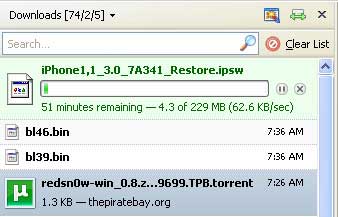
- This iPhone Jailbreak guide requires you to download the following: (1) RedSn0w for Windows, Mac or Linux; (2) the 3.0 firmware for iPhone 2G; and (3) the 3.9 and (4) 4.6 BootLoaders if you want to unlock your iPhone in addition to Jailbreaking. Save your downloads in a folder named “Jailbreak.”
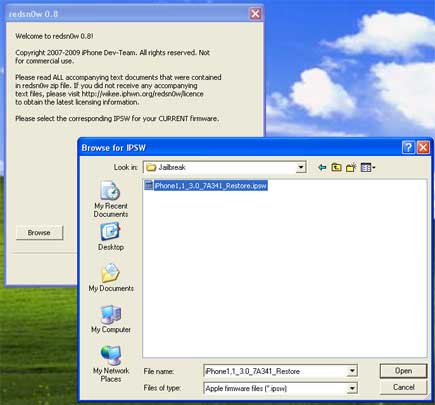
- Launch RedSn0w and click “Browse.” Find the 3.0 firmware (the .ipsw file you just downloaded to your Jailbreak folder) and select it. Then click “Next” to restore your 2G iPhone to the 3.0 firmware.
- Choose whether to install Cydia, install Icy and/or unlock your iPhone. I chose to install Cydia (like an “App Store” for Jailbreak) and to unlock my iPhone 2G, which allows the iPhone to be used on non-approved carriers.
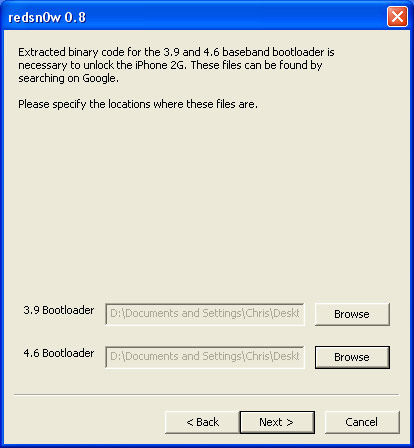
- If you chose to unlock your iPhone, RedSn0w will ask you to identify the bootloader files you downloaded in Step 1.
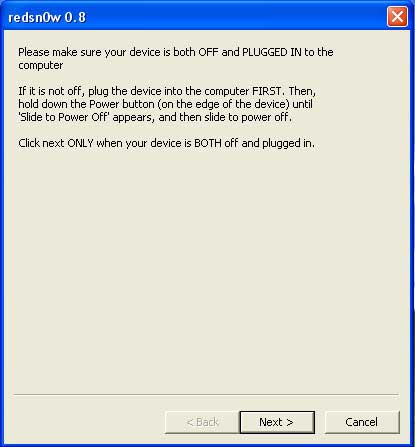
- Now turn off your iPhone (but leave it connected via USB), click “Next” and follow instructions.
In under a minute, you will have a Jailbroken iPhone 2G.
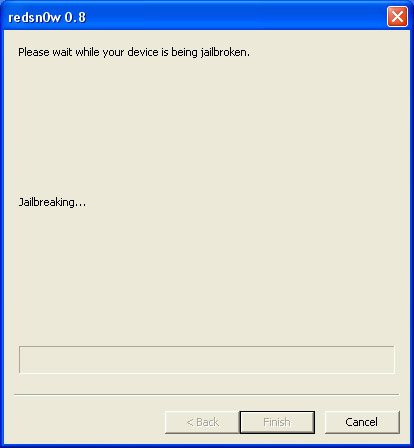
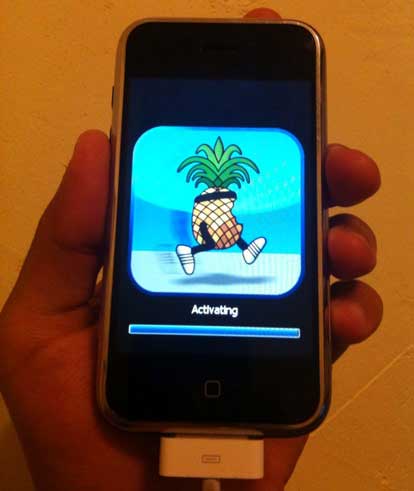
- Let your iPhone reboot, open Cydia and download a bunch of cool apps and modifications that you could not otherwise download with a factory iPhone.
What Do You Think?
Did this Jailbreak solution work for you? Got any iPhone Jailbreak tips? Let us know in the comments.
I have an old 2g iphone which is in Emergency call mode. I can’t seem to get it unlocked. I’m using windows 7 and don’t think I can get the old software to unlock it. Please help someone.
The instructions on this website are to be followed as mentioned to get it out of Emergency mode.
you can also contact us via our website if its too difficult for you.
getsupport.webs.com
You need to first connect your Apple logo stuck iPhone to iTunes.
And then hold the Home button and Power button at the same time for 10 seconds.
After 10 seconds, release the Power button. Do not release Home button, keep holding the Home button another 10+ seconds. You will see a message in iTunes that it has detected an iPhone in recovery mode.
Your iPhone is in DFU mode now. Click OK and click Restore button in iTunes.
I downloaded Everything, Got stuck on the .ispw download It Is a .zip Instead of a .ispw Stuck…
Broken link?
Hey if. I do this will this matlke it were I can use my prepaid data plan
my device is stuck at downloading jailbreak data
been through the process twice. everything looked ok and seemed to be working. then the phone sat there “downloading jailbreak data…” for about 5 minutes. rebooted and am back to only the emergency call state.
which is where i started. yay fun!
Mine is stuck saying “Downloading Jailbreak Data..” and everything else is completed. I hit finish on redsn0w because it said it was finished. What do I do?
Mine is also having the same trouble, has anyone found a solution or know the reason that causes this?
phone on eternal reboot loop is it bricked?
please tell me not!!!
Worked well. My 2G iPhone was initially on 1.1.4 (yes pretty old:) and by following another guide I upgraded to 3.1.3. Unfortunately this required an existing software of 3.1.2. After following instructions from a few other sites with no luck, I followed the instructions here and BINGO. Now unlocked and running 3.1.3.
oops. in reference to my last post, I meant I unplugged the iphone, then immediately plugged it back in (:
Thanks so much for clear instructions! Worked great on my iphone 2G. fyi the link to Redsn0w didn’t work for me; but easy enough to google up their page. Here’s a great spot to get firmware (including 3.0) : (?http://www.felixbruns.de/iPod/firmware/?). I was on a mac, but very similar…fyi at some point in the jailbreaking process Redsn0w got stuck saying “waiting for reboot”. I gave it an hour, then just unplugged the iphone. Redsn0w picked up fine after that and all went well.
Thanks again,
John
WRONG. FUCKING. IPSW.
BROKEN PHONE.
To those who got passed the jailbreaking but not unlocking you guys must of forgot to add the bootloader files so it just jailbroke it but never unlocked it
Hi,
I tried the steps above, but my iPhone 2g i stuck on the apple logo and it restarts itself over and over again automatically. iTunes also don’t recognize my iPhone. What should I do? I already tried to disconnect the cable and connect it again very fast; it didn’t work.
Thanks
were can i get the jail break for free or do i have to pay?…
hey mines is stuck at the reboot screen. i tried to do the thing with the cable but its still not working. pleeeaaaase help
it’s doing the same thing to mine. Stuck at reboot screen showing the apple logo. What do I do?
Hey,i dowload the files then it only works with winzip :S but anyway i save the file of 3.0 and bla bla,when i click on browse on redsnow,i try to search the fiel of 3.0 and is not there :S
Kitzo: It really is not Bricked but you cannot do anything basically with your phone. You will have to do a software Restore to fix your problem.
I have the same problem of Kizito, How do I can restore my software?
Kizito: Your iphone has basically locked itself or “Bricked” Which means that it will only be able to be used for emergency calls. you will have to do a software Restore and go back to the Apple software that came with your phone, meaning that the phone will no longer be jailbroken.
Thank you for jailbreak tutorial
hello there;
i have an iphone 2g which is also 8gb’but tried to update it one time and it locked all my other applications but can only show’emegency calls’.
i would like to get some help if u can.
I have the same problem as Kizito michael and I really want to know what I can do to fix this problem someone please email me with help thank you
Hey, It’s stuck at the “waiting for reboot” part. What do I do?
Mine is stuck there too!!! what do i do?!?!
disconnect the cable and connect it again really fast