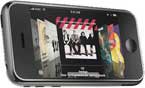
iPhone’s unique Cover Flow — you know, the view in the iPod app that lets you flick through album covers — makes it all the more appealing to collect album artwork for the music you download.
Otherwise, Cover Flow will display blank album covers, which is way less impressive than having a full album collection complete with artwork.
This tutorial will guide you through the different ways to add album art to the songs in your iTunes Music Library.
If you download your music straight from the iTunes Store, the album artwork is included with the purchase. iTunes 7 also lets you “Get Album Artwork” for songs you’ve downloaded from other sources.
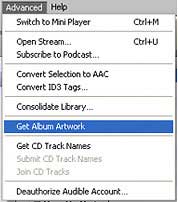
To get iTunes to populate your entire Music Library with album art, go to the Advanced menu and click “Get Album Artwork.”
This helpful iTunes feature will find most of your music’s album art, but a lot of times not all of it. This could be due to “inconsistencies between [your] info and Apple’s, such as genre or year of release,” according to Mac OSX Hints.
In this case, you can search for an album in the iTunes Store and compare its info to the info that you have saved for your music file. Then select your song and go to File >> Get Info to adjust the file details.
This can be somewhat tedious, though, especially if you have a lot of songs that need adjusting. That’s why you might find it easier to use the iTunes Art Importer, which automatically searches Amazon.com for cover art and applies it to your songs.
Using the iTunes Art Importer
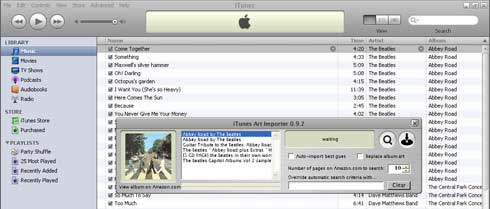
First, download the program and, if necessary, the Microsoft .NET Framework.
Once installed, open up the iTunes Art Importer along with iTunes. Now select the songs which need album art and click the magnifying glass button. The program will query Amazon and display a list of album artwork for you to choose from.
Once you’ve made your pick, select the songs in iTunes which you want the art applied to, and click the import button. To speed up the process, check off “Auto-import best guess” and click the import button. This saves time and works sort of like iTunes’ “Get Album Artwork” feature.
If the iTunes Art Importer can’t find the correct artwork, you can input a search term that will override the automatic search criteria. For example, when it couldn’t find my Dave Matthews “The Central Park Concert; Disk 1” I overrode the auto-search with “dave matthews central park” and it found the correct album art.
If after trying any of the above methods, you still have songs left without album artwork, you can manually add the artwork to iTunes.
How to Manually Add Album Art in iTunes 7

First, bring up the View menu and click “Show Artwork” to display the album artwork pane in the bottom left corner of iTunes. You’ll notice the box says “Now Playing” by default. Click “Now Playing” to switch to “Selected Item” mode.
Now select the songs you want to add artwork to, open up the folder on your computer where you’ve saved the album’s image, and drag the image into the Artwork pane.
This works especially well, I noticed, for audiobooks that may not be searchable by the iTunes Art Importer. Just Google the audiobook name, find a cover image and drag it onto the book’s audio files.
Once you’ve got all your album art worked out, sync everything to your iPhone and enjoy a fancy album collection that you can show off to your buddies.
If you found this tutorial helpful, link to it from your site and/or send it to a friend.
Thanks, it work well (very well) for me…great tutorial.
The function of scrolling through the library of album covers as show above is veeery slow on the OS5. Anyone is experiencing same thing? Any known cure to this?
I’m in the process of doing this now. One thing I’ve found helpful is to find the album artwork through a Google search or mainly through Amazon.com. Then I do a simple copy and paste of the artwork from Amazon into the “artwork” area on each individual iTunes file. I’ve found this quicker than saving the artwork to my computer and then bringing it up.
The last comment is very important. Make sure that the artwork is specified for every song in the album. Otherwise when you sync to your phone the artwork will not show up when in Cover Flow.
Hi,
My album’s artwork is all there in iTunes, but not on my iPhone. I have synced my phone twice but the artwork is still not there. Any ideas?
I try to find this solution many times before. Now it works – Thank you
I bought dozens of songs from itunes and the alot of the album artwork is missing, and they will not import…!!!
Im having the same problem as Sunil.
I keep getting a fatal error when I click on import
worst article ever.. this doesnt even help a bit.
Great 🙂
This program does not work at all for me it was unable to find anything
I manually attached album art to all songs in an album. The art work shows in list under Albums but not under the cover flow
What could be the reason?
In my country, we don’t have iTunes stores. I import the songs iTunes from the CD I bought. Can I still use the iTunes Art Importer to look for the album art work and add to iTunes/Iphone ?
I am having the same problem that Mark is having. Is there something I am doing wrong?
I tried over 300 songs in my library, even the ones with album art and I kept getting the “could not find album art” pop-up. Does this program even work? I opened it, then it opened iTunes on its own. I selected a song from iTunes then hit the magnafying glass, but nothing.
here’s a really cool site for free cover art. It’s really easy to use.
http://www.coolartflow.com
they’ve got lots of categories. can use it for anything you want.
check it out!
unfortunately if you don’t leave in one of the countries available on the drop down list you can’t do this, which mean I need to upload my artwork to my 800+ songs :/
But this software saved my ass 😀
you can download it from here:
http://itunes-art-importer.en.softonic.com/
thanks champ, much appreciate it 🙂
hy…is there a program which could display the lyrics of the song?
Ditto
I’m having trouble unzipping the file after download. Gives a message saying that the file is corrupt. Can I download it anywhere else?
Glad I could help 🙂
Thanks a lot, this article was very helpful 🙂
A related tip from my day of troubleshooting: If you have any trouble getting the covers to show on your iPhone, make sure you have associated the album art to ALL of the mp3’s in the album. If only one or two of the songs have the album art associated, it likely won’t show on the phone.
You can do this by selecting all of the songs from that album in iTunes, choosing “get info”, then checking that artwork box, double clicking on it, and choosing your album art image.
Enjoy!